
AI Automation Is Not a Chatbot: Where Companies Actually Get Value
May 13, 2026
AI automation creates value when it reduces repeated work, improves workflow visibility, and connects fragmented systems. This article explains why chatbots are only one interface, where companies usually find practical automation value, and how to scope AI-assisted workflows without building fragile shortcuts.
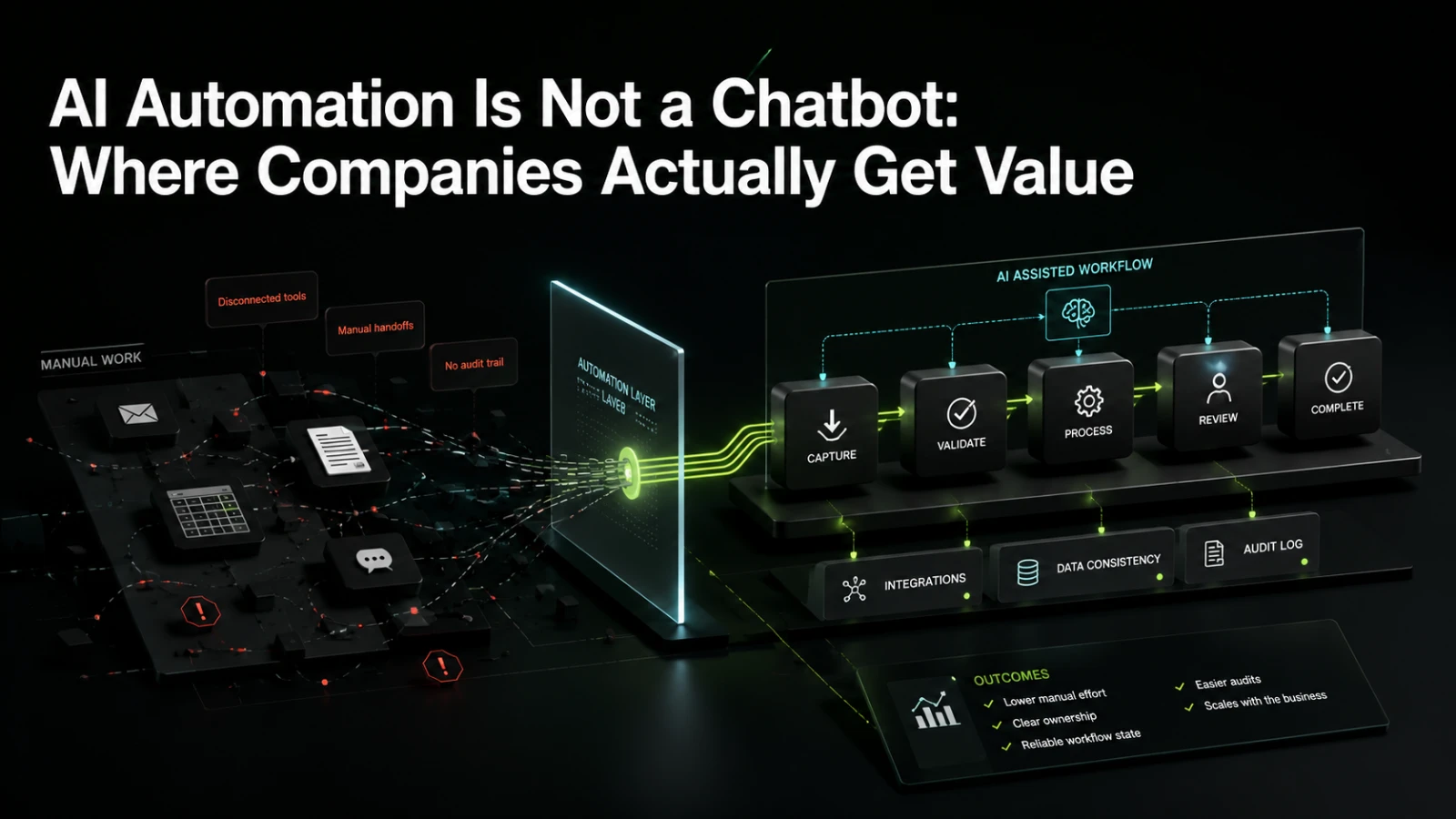
Many companies start their AI automation conversation with the wrong question: “Can we add a chatbot?” Sometimes the answer is yes. More often, the better question is: “Which repeated decisions, handoffs, checks, and data movements are slowing the business down?”
A chatbot can be useful, but it is only an interface. The real value usually sits behind it: structured workflows, integrations, approval logic, document processing, internal tools, audit trails, and clear ownership of what happens when automation is uncertain. Companies get value from AI when it makes operational work easier to inspect, easier to repeat, and less dependent on someone remembering the next step.
A chatbot is not the automation
A chatbot is a way for a person to interact with a system. It may answer questions, collect inputs, summarize information, or trigger an action. But if the business process behind it is still messy, disconnected, or undefined, the chatbot becomes a nicer front door to the same operational problem.
For example, a chatbot that lets a sales team ask “What is the status of this client onboarding?” is useful only if the onboarding state is tracked reliably somewhere. If the answer depends on emails, spreadsheets, manual notes, and a finance approval that happens outside the system, the chatbot cannot create dependable visibility by itself.
The automation value comes from the workflow underneath:
where data is captured
how it is validated
which systems are updated
what happens when information is missing
who approves exceptions
how actions are logged
how the team knows what is pending, blocked, or complete
AI may help interpret text, classify requests, extract fields, summarize context, or recommend next actions. But the software system still needs rules, state, permissions, integrations, and maintenance ownership.
Where companies actually get value from AI automation
The strongest AI automation opportunities are usually not flashy. They are repetitive, operational, and often hidden inside daily team routines.
Common examples include:
turning inbound emails or forms into structured work items
extracting relevant fields from documents, PDFs, invoices, contracts, or support requests
routing tasks to the right person or queue based on context
summarizing long histories before a human review
checking records across multiple systems before approval
detecting missing information before work moves forward
generating draft responses, reports, or internal notes for human review
syncing data between tools that do not naturally fit the company’s workflow
creating dashboards that show workflow state instead of scattered activity
This is where AI becomes commercially useful. It reduces repeated manual effort, shortens handoffs, and helps teams make better decisions with less searching.
The goal is not to remove humans from every step. The goal is to remove avoidable friction from the steps humans should not have to repeat manually.
Simple automation vs workflow system
Many teams begin with a small automation script or a no-code connection between tools. That can be a good first step. Problems appear when a quick automation starts carrying an important business process without enough structure around it.
Approach | Best fit | Visibility | Audit trail | Change cost | Main trade-off |
|---|---|---|---|---|---|
Manual process | Low volume, high judgment work | Depends on people and documents | Often scattered | Low at first, higher as volume grows | Flexible but hard to scale |
Simple automation | Repetitive task with clear inputs and outputs | Limited unless designed in | Usually minimal | Low for small changes | Fast to start, fragile if process expands |
Chatbot interface | Guided interaction, support, internal search, data collection | Good for user interaction, not enough for process control | Depends on backend system | Medium | Helpful interface, but not the workflow itself |
AI-assisted workflow system | Repeated process with exceptions, approvals, and integrations | Easier to inspect | Can be designed intentionally | Higher upfront, lower operational confusion later | Requires clearer scope and ownership |
Custom internal tool | Business-specific process that generic tools do not handle well | Strong if designed around workflow state | Strong if logging is included | Depends on architecture |
The practical question is not whether AI should be used. The practical question is what level of system the workflow deserves.
What teams usually get wrong
The most common mistake is automating the visible symptom instead of the workflow.
A team may say, “We need AI to answer customer questions.” After reviewing the process, the real issue may be that customer data is split across the CRM, billing system, support inbox, and a spreadsheet maintained by operations. In that case, a chatbot may answer only simple questions. The deeper value is in connecting the systems, defining a reliable customer status, and giving support staff a clear view of what has happened.
Another mistake is treating AI output as final when it should be part of a controlled workflow. AI can produce useful summaries, classifications, or drafts, but some tasks still need human approval, especially when the cost of a wrong action is high.
Rushed implementations often fail because they ignore:
error handling
permissions
data quality
exception queues
workflow state
integration limits
audit requirements
maintenance responsibility
what happens when AI confidence is low
AI automation works best when uncertainty is designed into the process instead of hidden inside it.
A dependable system should not pretend every input is clean. It should make unclear cases visible, route them correctly, and allow the team to improve the workflow over time.
What to automate first
The best first automation target is usually a process that is frequent, painful, and bounded.
Good candidates often have these traits:
The work happens many times per week.
The input format is semi-structured, such as emails, forms, PDFs, tickets, or records.
The current process requires copying, checking, summarizing, or routing information.
The business rules are understandable, even if exceptions exist.
The team can clearly define what “done” means.
There is a human owner for exceptions.
Examples might include supplier onboarding, quote intake, support triage, invoice review, client onboarding, compliance checks, internal approvals, or report preparation.
A poor first candidate is a vague process with unclear ownership, changing rules, or high-risk decisions that no one can define. AI will not fix a process the business itself cannot explain.
What should stay manual
Not every step should be automated. Some decisions are better left manual, especially in the first version.
Keep humans involved when:
the decision has financial, legal, contractual, or reputational risk
the data is incomplete or unreliable
the process depends on judgment that is not yet well understood
exceptions are common and hard to categorize
the company needs an approval trail
the team is still learning what the correct workflow should be
This does not mean AI has no role. It can prepare the work so humans spend less time searching and more time deciding. For example, an AI-assisted system can summarize a case, extract the key fields, compare them against internal rules, show missing data, and suggest a next action. The final approval can still remain with a person.
That kind of design is often more useful than full automation because it lowers risk while still reducing operational load.
The software layer matters
AI automation becomes dependable when it is treated as part of a software system, not a standalone prompt.
A production workflow usually needs several pieces around the AI model:
Data intake: where requests, documents, messages, or records enter the system.
Normalization: how unstructured input becomes structured fields.
Business rules: what the system can decide directly and what needs review.
Workflow state: whether an item is new, pending, blocked, approved, rejected, or complete.
Integrations: which systems need to be read from or updated.
Permissions: who can view, approve, edit, or override.
Audit trail: what happened, when it happened, and who or what triggered it.
Exception handling: where uncertain or failed cases go.
Monitoring: how the team spots broken flows, unusual volume, or repeated failures.
Without this layer, AI automation often becomes another fragile tool. It may work in a demo but create confusion in production.
How to scope the first useful version
The first version should not try to automate the entire business process. It should prove value in one bounded workflow.
A practical scope might define:
the exact trigger that starts the workflow
the input sources and required fields
the systems that must be connected
the decisions AI is allowed to assist with
the decisions that require human approval
the exception path for missing or uncertain data
the dashboard or queue the team will use
the audit information that must be retained
the success signal, such as fewer manual checks or faster handoff
This is where product thinking matters. The first version should be narrow enough to build responsibly, but complete enough to be used in real work.
A prototype can show whether the idea is useful. A production-ready workflow must also answer operational questions: who owns it, how it fails, how it is changed, and how the team trusts it.
When a company may need a custom approach
Generic SaaS tools and no-code automation platforms can be useful, especially for simple processes. But companies often reach a point where the workflow does not fit neatly into one tool.
That tends to happen when:
several systems need to share state
approvals depend on company-specific rules
users need a custom internal interface
the team needs stronger auditability
manual exceptions need a clear queue
data quality varies across sources
the process is commercially important
existing tools create too many workarounds
At that point, the question becomes whether the company should keep adding patches or design a more dependable workflow layer.
Custom software does not have to mean a large platform from day one. Often, the right move is a focused internal tool, integration layer, or AI-assisted workflow that handles one process properly and can grow from there.
Practical conclusion
AI automation is not valuable because it looks intelligent in a chat window. It is valuable when it reduces repeated work, connects disconnected systems, improves workflow visibility, and gives teams a clearer way to handle exceptions.
For many companies, the best AI automation project will not start with a chatbot. It will start with a workflow map, a painful repeated process, a clear definition of state, and a decision about where humans should stay in control.
The companies that get value from AI automation are usually the ones that treat it as software delivery, not a prompt experiment. They define the process, build the right system around it, and keep the first version focused on real operational use.
If this resembles a workflow inside your business, Aptenova can help turn the first useful version into a clear software scope.
Turn insight into scope
Working through a similar problem?
Share the workflow, product idea, or system risk. Aptenova can help decide what to simplify, automate, rebuild, or launch first.