
Why Internal Tools Fail: The Hidden Cost of Spreadsheet Operations
May 13, 2026
Spreadsheets often become unofficial internal tools, until ownership, workflow state, approvals, audit trails, and integrations become too fragile to manage. This article explains why spreadsheet-based operations fail, what the real costs look like, and how teams can scope more dependable internal systems.
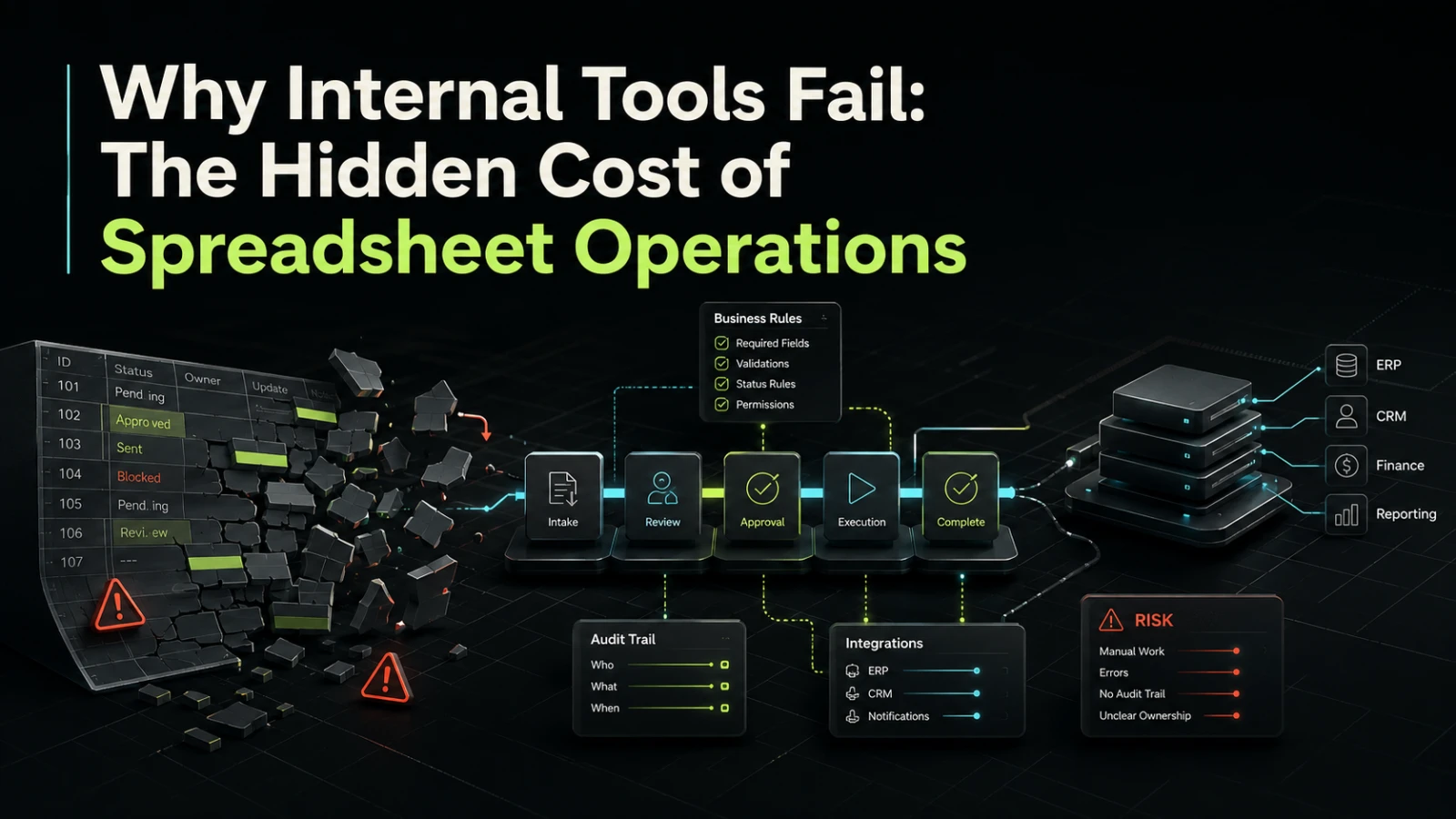
Spreadsheets are often the first internal tool a business builds. They are fast, familiar, flexible, and cheap to start. A team can track orders, approve requests, manage onboarding, coordinate suppliers, or calculate pricing without waiting for a software project.
The problem is not that spreadsheets are bad. The problem is that many companies keep using them after the workflow has become operationally important. At that point, the spreadsheet is no longer just a file. It is a production system without the controls, ownership, visibility, and maintainability that production systems need.
The moment a spreadsheet becomes an internal tool
A spreadsheet becomes an internal tool when people depend on it to make decisions, move work forward, or coordinate across teams.
That usually happens gradually. One person creates a tracker. Another adds a formula. Someone else adds a status column. A manager asks for weekly reporting. Later, the spreadsheet becomes connected to email, forms, exports, copy-paste routines, or manual approvals.
Nothing dramatic happens on day one. The risk appears when the spreadsheet becomes the source of operational truth.
Common signs include:
Multiple people editing the same operational data
Statuses such as
pending,approved,sent, orblockedManual handoffs between sales, finance, operations, support, or management
Repeated copy-paste between systems
Hidden formulas that only one person understands
Approval decisions that happen in comments, chat, or email
Reports that require manual cleanup before anyone trusts them
Workflows that stop when one person is unavailable
These are not spreadsheet problems. They are system design problems that happen to live inside a spreadsheet.
Why spreadsheet-based operations fail
Most spreadsheet failures come from a mismatch between the tool and the workflow. Spreadsheets are good for analysis, planning, lightweight tracking, and ad hoc data work. They are weaker when the business needs controlled state, permissions, integrations, history, and repeatable execution.
Ownership is unclear
In a proper internal system, ownership can be defined at several levels: who owns the workflow, who owns the data, who can change rules, who approves exceptions, and who maintains the software.
In a spreadsheet, ownership is often informal. The “owner” may simply be the person who created the file. That works until the business depends on it.
When rules are stored in cells, formulas, notes, and individual habits, operational knowledge becomes hard to transfer. A new team member may understand the visible columns but not the assumptions behind them. A manager may trust a report without knowing that several rows were manually corrected before export.
Unclear ownership usually increases coordination cost. Every change becomes a discussion, every mistake becomes a search, and every exception depends on personal memory.
Workflow state becomes unreliable
Many business processes depend on state. A request is submitted, reviewed, approved, fulfilled, invoiced, rejected, or escalated. A lead is qualified, assigned, contacted, converted, paused, or lost. An order is received, checked, packed, shipped, refunded, or disputed.
A spreadsheet can store a status column, but it rarely enforces the rules around that status.
For example:
Can a row move from
draftdirectly toapproved?Who is allowed to approve it?
What happens if required fields are missing?
Was the customer notified?
Did the finance system receive the update?
Who changed the status, and when?
When state is not controlled, teams often rely on habits and reminders. That may work at low volume, but it becomes fragile as more people, exceptions, and integrations are added.
The hidden cost is not only wasted time
The visible cost of spreadsheet operations is manual effort. People spend time updating rows, checking formulas, reconciling exports, and asking for status updates.
The hidden cost is usually larger. It shows up as rework, slower decisions, avoidable errors, weak audit trails, and delayed delivery.
Area | Spreadsheet-based operation | Dependable internal tool |
|---|---|---|
Manual effort | Repeated updates, copy-paste, checks, and reminders | Guided workflow, validation, automated handoffs |
Visibility | Status depends on who updated the file and when | Current workflow state is easier to inspect |
Audit trail | Changes may be hard to explain after the fact | Key events, users, and timestamps can be tracked |
Ownership | Rules often live in formulas and team habits | Workflow logic has clearer technical and business ownership |
Integration | Imports and exports often rely on manual steps | Systems can exchange data through defined interfaces |
Change cost | Small changes can break formulas or reporting | Changes can be scoped, tested, and released more predictably |
Maintenance | Usually dependent on a few internal experts | Can be documented, monitored, and improved over time |
Best fit | Early exploration, low-risk tracking, analysis | Repeated operational workflows with business impact |
The important point is not that every spreadsheet should become software. Many should not. The question is whether the workflow has become important enough that the cost of fragility is higher than the cost of building something more dependable.
What teams usually get wrong
Internal tool projects often fail because the team jumps from frustration to implementation too quickly.
A common pattern looks like this:
A spreadsheet becomes painful.
The team asks for “a system to replace it.”
Everyone tries to include every edge case from day one.
The project becomes larger than expected.
The first version is delayed, overcomplicated, or underused.
The mistake is treating the spreadsheet as the specification.
A spreadsheet shows current behavior, but it does not always show the real workflow. It may include old columns, temporary fixes, duplicate meanings, manual exceptions, and reporting shortcuts. If software simply copies that structure, the business may end up with a cleaner interface around the same operational confusion.
A better approach is to identify the workflow behind the spreadsheet.
Ask:
What decision does this process support?
What are the real workflow stages?
Which fields are required at each stage?
Which steps are manual because judgment is needed?
Which steps are manual only because no integration exists?
Where do errors usually enter the process?
Which handoffs create the most delay?
Which reports are actually used to make decisions?
These questions turn a spreadsheet replacement into a system design conversation.
Manual, automated, and software-controlled work
Not every part of an internal process should be automated. Some decisions require human judgment, commercial context, or exception handling. The goal is not to remove people from the workflow. The goal is to remove unnecessary manual coordination.
A useful internal tool usually separates three types of work.
Type of work | Example | Better approach |
|---|---|---|
Human decision | Approving a custom discount, reviewing an exception, prioritizing a request | Keep manual, but make context, status, and responsibility clear |
Repeated administrative step | Copying form data into another system, sending routine notifications, generating a task | Automate where rules are stable |
System-controlled workflow | Required fields, status transitions, permissions, timestamps, integrations | Build into the internal tool so the process is easier to reason about |
This distinction matters because rushed automation can create new problems. If a team automates a poorly understood process, mistakes may happen faster. If it builds software around unclear ownership, the system may still require constant manual correction.
Good internal tools do not just digitize work. They make the workflow more explicit.
When a spreadsheet is still the right tool
A spreadsheet is often still the right choice when the process is exploratory, low-risk, temporary, or mostly analytical.
It may be enough when:
One person owns the file and understands the logic
The data does not drive critical operational decisions
The workflow changes every week
Mistakes are easy to detect and cheap to fix
There are no sensitive permissions or approval requirements
The file is used for planning rather than execution
Building software too early can create unnecessary maintenance. A custom tool needs product decisions, technical ownership, deployment, support, and future change management. If the workflow is not stable enough, a spreadsheet may be the more practical option.
The right question is not “spreadsheet or software?” It is “what level of operational dependability does this workflow now require?”
What to define before building an internal tool
Before replacing a spreadsheet, define the smallest useful version of the system. This should be smaller than the full dream version, but strong enough to remove a real operational bottleneck.
A practical first scope should include:
The primary workflow, from start to finish
The users and roles involved
The required data at each stage
The allowed status changes
The most important validation rules
The systems that must be integrated now
The systems that can wait
The minimum reporting needed for decisions
The operational risks that must be reduced first
This helps avoid two common extremes: building a shallow interface that does not solve the real problem, or building a large platform before the team has validated the workflow.
For many businesses, the first useful version is not a full internal platform. It may be a focused tool for approvals, intake, assignment, reporting, reconciliation, or integration between two systems. A narrow tool with clear ownership is often more valuable than a broad system with unclear behavior.
How AI-assisted workflows fit into the picture
AI can help with internal operations, but it does not remove the need for workflow design.
For example, AI may help classify requests, summarize long inputs, draft responses, extract structured information, or support triage. These can reduce manual effort when used carefully. But the surrounding system still needs permissions, review steps, error handling, auditability, and clear fallback paths.
In operational software, AI should usually support a defined workflow rather than replace one. A team still needs to know what happens after a suggestion is generated, who reviews it, what data is stored, and how exceptions are handled.
This is where AI-augmented delivery can be useful without becoming hype-driven: faster analysis, better workflow mapping, assisted prototyping, and targeted automation, while still treating reliability and ownership as software design concerns.
When to talk to a software partner
A software partner becomes relevant when the spreadsheet is no longer just inconvenient, but is starting to create operational risk.
That may be the case when:
The process involves multiple teams or approval paths
The spreadsheet controls revenue, fulfillment, customer experience, or compliance-sensitive work
Manual reconciliation is slowing down decisions
Integrations are handled through exports and copy-paste
Reporting is no longer trusted without manual cleanup
One person has become the unofficial maintainer of a critical workflow
The business wants to scale the process without increasing coordination overhead
At that point, the useful conversation is not simply “build us an app.” It is more specific: which workflow should become software, what should remain manual, what needs to integrate, what risks matter most, and what first version would create real operational value.
If this resembles a workflow inside your business, Aptenova can help frame the workflow, risk, and first practical build.
Conclusion
Spreadsheet-based operations usually fail slowly. They start as practical shortcuts, then become unofficial systems, then become fragile infrastructure for important business work.
The cost is not only time spent editing rows. It is unclear ownership, unreliable workflow state, weak audit trails, hidden logic, manual reconciliation, and higher change risk.
A dependable internal tool does not need to be large. It needs to make the workflow explicit, reduce unnecessary manual coordination, define ownership, and connect the right systems at the right stage. The strongest first version is usually focused, practical, and built around the operational problem rather than the spreadsheet that currently contains it.
Turn insight into scope
Working through a similar problem?
Share the workflow, product idea, or system risk. Aptenova can help decide what to simplify, automate, rebuild, or launch first.