
Building Software Is Not the Same as Owning a System
May 13, 2026
Many teams can ship software. Fewer are prepared to own the workflow, data, integrations, risks, and changes that come after launch. This article explains the practical difference between building software and operating a dependable business system.
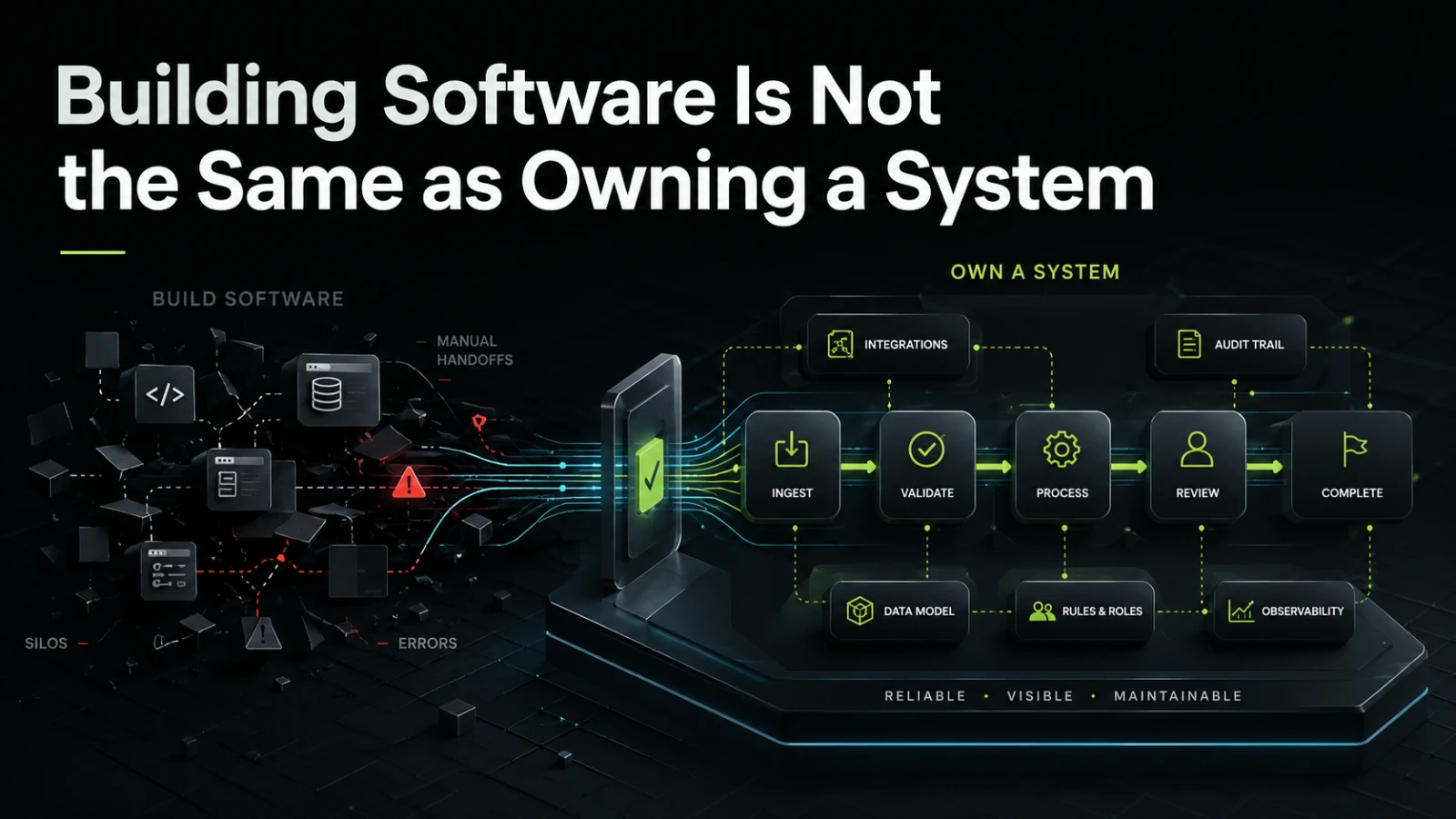
Shipping software is only one part of the job. A team can design screens, write code, connect an API, and launch a working product, yet still end up with something the business does not truly control.
Owning a system means something more demanding. It means the workflow is clear, the data has a source of truth, failures are visible, access is managed, changes can be made without guesswork, and the people using the system know who is responsible when something breaks. For founders, operators, product owners, and technical leads, this difference matters because the real cost of software often appears after the first version is live.
Building software focuses on delivery
Building software is usually framed around scope, features, deadlines, and release. This is necessary. Without delivery, there is no system to use.
A typical build conversation includes questions like:
What should the first version do?
Which screens are required?
Which integrations are needed?
What data needs to be stored?
Who can access what?
What is the launch date?
These questions are useful, but they do not go far enough. They describe the artifact being built, not the business responsibility being created.
A workflow tool, customer portal, approval system, billing connector, reporting dashboard, or internal operations platform does not stop evolving after launch. People depend on it. Data moves through it. Exceptions happen. Business rules change. The original assumptions become outdated.
That is where ownership begins.
Owning a system focuses on continuity
Owning a system means the business can depend on it beyond the first release. It is not only about whether the software works during a demo. It is about whether the system remains understandable, maintainable, and safe enough to operate when real work flows through it.
System ownership includes:
Clear responsibility for business rules
Clear responsibility for technical maintenance
Visibility into workflow state
A reliable audit trail for important actions
A plan for errors, retries, and failed integrations
Access control that matches real roles
Documentation that helps future changes
A practical way to improve the system without rebuilding it each time
This does not mean every internal tool needs enterprise-level infrastructure. It means the level of ownership should match the operational importance of the system.
A lightweight tool that supports a small team may need simple admin controls, basic logs, and clear data exports. A platform that coordinates finance, compliance, customer delivery, or partner operations needs more deliberate architecture, observability, and change control.
The common mistake: treating launch as the finish line
Many software problems start because the build is treated as the main event. The team agrees on features, approves designs, launches the tool, and assumes the hard part is complete.
In reality, launch is when the system starts meeting messy operational truth.
A few examples:
A customer record is updated in one tool but not another.
An approval is sent to the wrong person because roles changed.
A background process fails silently.
A spreadsheet is still used because the new tool does not handle exceptions.
A report looks correct, but nobody knows how the numbers are calculated.
A new workflow rule requires changes in three places.
The original developer understands the logic, but no one else does.
These are not just technical issues. They create manual checking, slower decisions, repeated support questions, and reduced trust in the system.
A software build is successful when it launches. A business system is successful when people can rely on it after the launch pressure is gone.
Software project vs owned system
The difference becomes clearer when comparing how decisions are made.
Area | Building software | Owning a system | Main operational risk |
|---|---|---|---|
Scope | Focuses on requested features | Focuses on workflow responsibility | Features may work, but not cover real exceptions |
Data | Stores what the app needs | Defines source of truth and data quality rules | Conflicting records across tools |
Integrations | Connects systems | Handles failure, retries, mapping, and ownership | Silent errors or manual reconciliation |
Access | Adds users and permissions | Matches access to business roles and change process | Too much access or blocked work |
Reporting | Shows useful views | Explains calculation logic and data freshness | Reports are used without confidence |
Maintenance | Fixes bugs after launch | Plans for updates, monitoring, and future change | High cost of small changes |
Documentation | Describes how it was built | Explains how the system should be operated | Knowledge depends on individuals |
Success measure | Delivered release | Dependable workflow in production | Launch happens, but adoption stays fragile |
This is why two systems with similar features can produce very different outcomes. One may technically function but require constant manual supervision. The other may be easier to inspect, support, and adapt.
Why ownership matters for internal tools
Internal tools are often built to reduce manual work: approvals, scheduling, quoting, onboarding, reconciliation, reporting, inventory handling, document review, task routing, or customer operations.
The first version usually starts with a clear pain point. A spreadsheet is too fragile. People copy data between systems. Approvals happen in email. Reporting takes too long. A SaaS tool almost fits, but not quite.
A custom internal tool can help, but only if it is designed around the real operating model.
For example, an approval workflow is not just a form and a submit button. It may need:
Draft, submitted, approved, rejected, cancelled, and expired states
Role-based access for requesters, reviewers, admins, and finance users
Notifications that do not create duplicate work
A way to handle missing information
Comments or history for later review
Integration with accounting, CRM, or document storage
A clear owner for changing approval rules
Without these details, the tool may move the problem from a spreadsheet into a custom interface. The manual work remains, but becomes harder to see.
Why ownership matters for platforms and customer-facing products
For customer-facing platforms, the stakes are different but the principle is the same. The product is not only a collection of screens. It becomes part of how customers, partners, or internal teams interact with the business.
A founder building a first software product may focus on speed, validation, and visible functionality. That is reasonable. Early versions should not be overbuilt.
But even a lean first version needs enough system thinking to avoid expensive rework later. This includes decisions such as:
Which data model can support the next likely workflow?
Which parts should be custom, and which can use proven services?
Where should manual review stay in place?
What needs to be logged from the beginning?
How will admin users resolve customer issues?
What assumptions are risky if the product gains traction?
Owning a system does not mean building everything at once. It means making early decisions that do not trap the business unnecessarily.
The hidden cost of unclear ownership
When ownership is unclear, software becomes difficult to improve.
Small requests become slow because nobody knows where the rule lives. Support issues bounce between business and technical teams. Integrations become risky because data mappings are not documented. Operators create side spreadsheets because the system does not reflect edge cases. Developers hesitate to change old logic because its purpose is unclear.
The cost is not only development time. It appears as:
Repeated manual checking
Slower onboarding for new team members
More coordination between departments
Higher risk during changes
Reduced confidence in reports
Longer support cycles
More rework when the business process changes
A dependable system reduces this ambiguity. It does not remove every problem, but it makes the system easier to reason about in production.
What to define before building
Before starting a custom software project, it helps to define ownership as part of scope. This does not require a heavy specification document. It requires clear answers to practical questions.
1. What workflow is the system responsible for?
Be specific. “Manage orders” is vague. “Receive orders from the customer portal, validate required data, assign fulfillment tasks, update delivery status, and notify finance when ready to invoice” is much easier to build and operate.
2. What should remain manual?
Not every step should be automated. Human review may be useful when judgment, exception handling, risk, or customer context matters. Good systems often reduce repeated manual work while keeping intentional human control where it adds value.
3. Where is the source of truth?
If customer, order, payment, inventory, employee, or project data appears in several tools, the system needs clear rules. Which tool owns the record? Which system can update it? What happens when data conflicts?
4. What happens when something fails?
Failures should not be surprises. Integrations can time out. Emails may not send. Payment events can arrive late. Files may be malformed. A dependable system makes failure visible and gives the team a path to resolution.
5. Who owns future changes?
Business rules change. Pricing changes. Approval thresholds change. Team roles change. If every small change requires risky technical work, the system may become expensive to maintain. Some rules may belong in admin settings, while others should stay in code for safety and consistency.
Prototype, first useful version, or production system?
One useful way to reduce risk is to name the stage honestly.
Stage | Goal | Best fit | What not to expect |
|---|---|---|---|
Prototype | Test an idea or workflow | Early validation, demos, internal alignment | Full reliability, security model, or long-term maintainability |
First useful version | Support a real but narrow workflow | Small teams, controlled rollout, measurable learning | Complete automation of every edge case |
Production system | Run an important business process | Operational dependency, external users, integrations | Fast changes without governance or ownership |
Problems often happen when a prototype is treated like a production system. The business starts depending on something that was never designed for that responsibility.
The reverse can also be wasteful. A small experiment does not need a large architecture. The key is to match the build approach to the operational role the software will play.
Where Aptenova fits
Aptenova works best where software is tied to real operations: internal tools, B2B systems, automation workflows, integrations, web platforms, and AI-assisted processes that need practical delivery rather than abstract strategy.
The useful conversation is not only “what should we build?” It is also:
What business process should this system own?
Which manual steps should be reduced first?
Which integrations create the highest risk?
What needs to be visible to operators?
What should the first version prove?
What would make this easier to maintain after launch?
If this is the kind of system you are trying to make dependable, Aptenova can help assess the workflow, risk, and first practical build.
Conclusion
Building software creates a product, tool, or platform. Owning a system creates responsibility for the workflow that software supports.
The difference shows up after launch, when users depend on the system, data moves between tools, edge cases appear, and business rules change. A team that only thinks in features may ship something usable for a moment. A team that thinks in systems is more likely to build something the business can operate, inspect, adapt, and trust.
Before starting the next build, define more than the screens and features. Define the workflow, the source of truth, the failure paths, the maintenance responsibility, and the level of dependability the business actually needs.
That is where software starts becoming a system.
Put it into practice
Working through a similar problem?
Tell us about your product and the change you need. We can discuss a focused feature, a new integration, an AI workflow or a first release.