
When Your MVP Becomes a Liability: How to Know It Is Time to Rebuild
May 12, 2026
An MVP is useful when it proves demand and guides the next build decision. It becomes a liability when it hides operational risk, slows delivery, and forces teams to work around the system instead of through it.
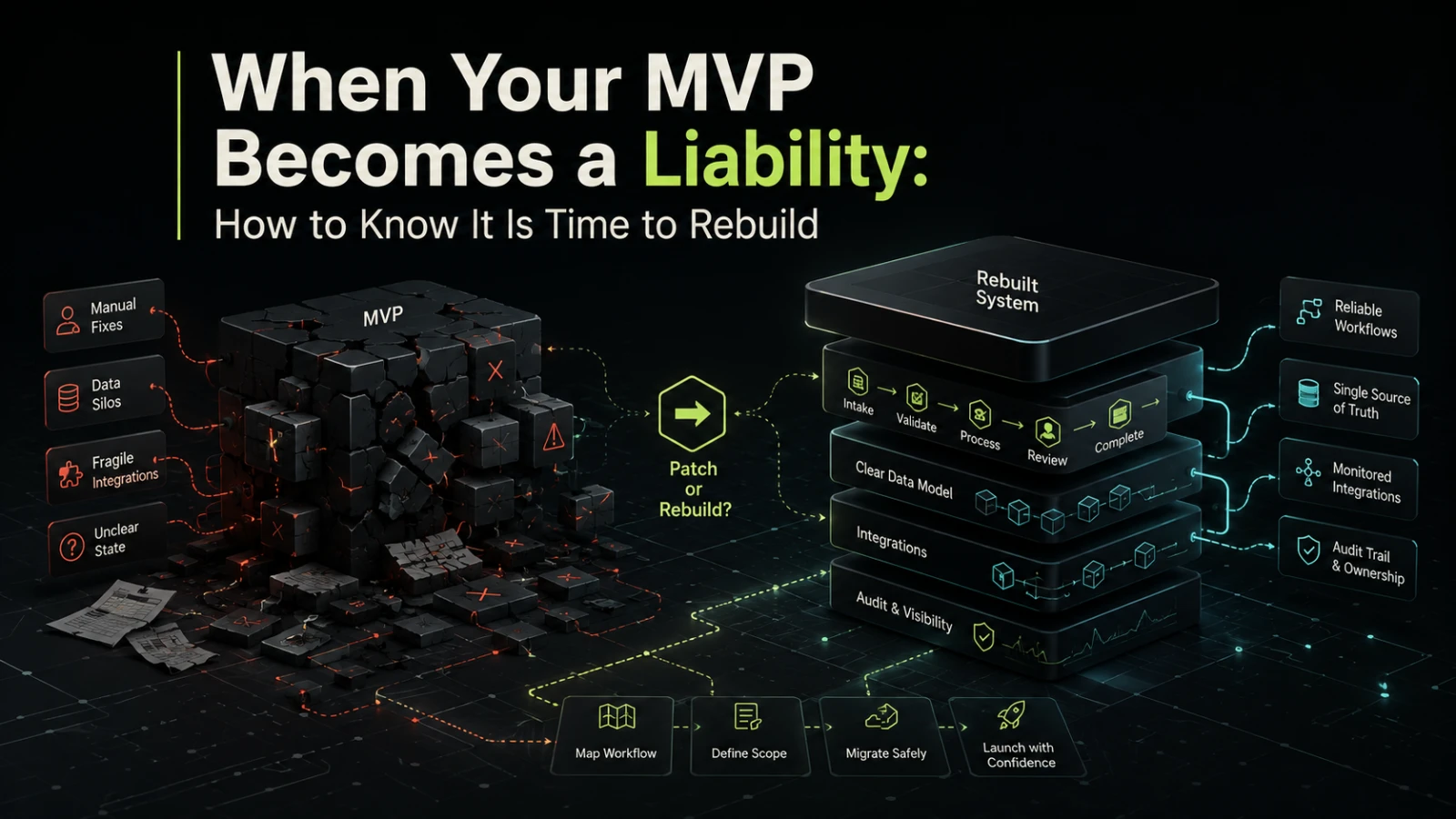
An MVP is not supposed to be the final system. It is supposed to answer a question: does this product, workflow, platform, or internal tool create enough value to justify the next investment?
The problem starts when the MVP succeeds. Customers use it, the team depends on it, integrations are added, manual fixes become routine, and the original shortcuts turn into operational constraints. At that point, the question changes from “Can this work?” to “Can we safely keep building on this?”
A rebuild is not always the right answer. Many MVPs can be improved in phases. But when the software starts increasing risk faster than it creates value, treating it as a production platform can become more expensive than rebuilding it with clearer ownership, cleaner workflows, and a dependable technical foundation.
The real purpose of an MVP
A useful MVP reduces uncertainty. It helps a team test a workflow, validate demand, understand user behavior, or prove that a process can be automated.
It should not be judged only by whether it works on a normal day. It should be judged by what it teaches the business.
A healthy MVP usually has clear limits:
it supports a narrow set of users or workflows
it avoids unnecessary automation
it keeps technical decisions simple
it accepts some manual work while demand is uncertain
it creates enough evidence to guide the next version
Those limits are not failures. They are part of the trade-off. The danger appears when the business keeps expanding the MVP without changing the architecture, ownership model, data structure, or operational process behind it.
An MVP becomes risky when the business forgets which parts were intentionally temporary.
Signs your MVP has become a liability
The most obvious sign is not bad code. It is operational friction.
A system can look acceptable from the outside while creating daily problems inside the business. Teams start adding spreadsheets next to it. Support work increases. Reporting becomes unreliable. Product changes take longer than expected. Nobody is fully confident about what happens when something fails.
Common warning signs include:
critical workflows depend on manual fixes by one person
the same data is copied between tools, spreadsheets, and inboxes
users avoid parts of the system because they do not trust them
simple changes require risky edits across unrelated features
error handling is unclear or missing
permissions were added quickly and are hard to reason about
reporting logic does not match operational reality
integrations fail silently or require repeated manual checking
the team cannot explain the current workflow state without asking several people
These are not just technical issues. They affect delivery speed, customer experience, internal accountability, and the ability to make decisions from accurate data.
Prototype behavior vs production behavior
Many MVPs fail later because they were designed around the happy path. That is acceptable during validation. It becomes a problem once the system becomes part of daily operations.
Area | Prototype version | Production-ready version | Risk if ignored |
|---|---|---|---|
Workflow state | Basic statuses or manual notes | Clear states, transitions, and ownership | Work gets lost between teams |
Data model | Enough fields to test the idea | Structured data that supports reporting and change | Reports become unreliable |
Permissions | Simple admin or shared access | Role-based access aligned with real responsibilities | Sensitive actions become hard to control |
Integrations | One-off scripts or manual imports | Monitored, recoverable data exchange | Failures are missed until users complain |
Error handling | Developer checks logs when needed | Visible errors, retry logic, and escalation paths | Operations depend on hidden technical knowledge |
Change process | Quick edits when requested | Planned releases with testing and rollback options | Small changes create unexpected breakage |
Documentation | Informal team memory | Enough system and workflow documentation for support | Knowledge stays locked with one person |
The point is not to make every MVP enterprise-grade from day one. The point is to recognize when the operating environment has changed. A system serving five early users can tolerate more manual supervision than a system that supports core business workflow across sales, operations, finance, or customer success.
Why extending the MVP can become expensive
Keeping the MVP may feel cheaper than rebuilding because the cost is spread across many small fixes. But small fixes can hide a larger structural problem.
A team may spend weeks adding features that would have taken days in a cleaner system. Developers become cautious because unrelated areas are tightly connected. Product owners avoid changes because they are hard to estimate. Operations teams build manual checks because they cannot trust the software to show the full state.
This creates a compound cost:
more coordination before each change
more regression risk after each release
more support work after edge cases
more manual reporting outside the system
slower onboarding for new team members
weaker confidence in automation or AI-assisted workflows
AI does not remove this problem. If the underlying workflow state, permissions, and data quality are unclear, adding AI can make the system harder to audit. Before adding AI-assisted classification, routing, summarization, or decision support, the core process must be inspectable and understandable.
When improvement is enough
A rebuild is not the only path. In many cases, the better move is a controlled remediation plan.
Improvement may be enough when:
the core data model still reflects the business
only a few modules create most of the friction
the team can safely isolate problem areas
the system has clear ownership
integrations are limited and understandable
user demand is stable enough to prioritize fixes
In this case, the practical approach is usually to stabilize first, then improve. That can mean adding logging, documenting workflows, tightening permissions, removing duplicated logic, improving test coverage, or replacing one fragile integration at a time.
This is often the right route when the product is commercially useful but not yet complex enough to justify a full rebuild.
When a rebuild is the safer option
A rebuild becomes more reasonable when the existing system prevents the business from operating or changing safely.
Situation | Improve existing system | Rebuild |
|---|---|---|
Main issue is one unstable feature | Usually sensible | Usually unnecessary |
Data model no longer matches the business | Often limited value | Often worth evaluating |
Core workflows require manual correction | Possible if localized | Strong candidate |
New features repeatedly break old behavior | May help temporarily | Strong candidate |
Security or permissions are hard to reason about | Depends on scope | Often safer |
Integrations are undocumented and fragile | Possible in phases | Worth evaluating |
Team cannot estimate changes with confidence | May require discovery first | Often likely |
MVP was built for validation, now supports operations | Depends on growth path | Often worth scoping |
A rebuild should not mean “start again because the code is messy.” It should mean the current foundation no longer fits the operating model, risk level, or future product direction.
That distinction matters. Rebuilding without clarifying workflows, data ownership, integrations, and release priorities can recreate the same problems in a newer stack.
What to define before deciding
Before deciding to rebuild, the team should create a clear view of the system as it exists now and the business it needs to support next.
Useful questions include:
Which workflows are business-critical?
Which users depend on the system every day?
Where does data enter, change, and leave the system?
Which manual workarounds exist because the software cannot be trusted?
Which integrations are essential, optional, or temporary?
Which permissions and approvals need to be auditable?
Which parts of the MVP still reflect the product direction?
Which parts were built only to test early demand?
What must remain running during migration?
What is the smallest dependable version of the rebuilt system?
The last question is especially important. A rebuild should not become an attempt to design every future feature at once. The goal is to replace the risky foundation with a clear, maintainable base that supports the next stage of the business.
A practical rebuild path
A dependable rebuild usually starts with discovery, not implementation.
The first step is to map the real workflow. That includes not only what the software does, but also what people do around it: approvals, exports, spreadsheet edits, manual checks, customer messages, finance reviews, and support escalations.
The second step is to separate permanent requirements from temporary workarounds. Some manual steps should be automated. Others should remain manual because they require judgment, approval, or low-volume exception handling.
The third step is to define the migration path. For a business-critical system, this may involve running parts of the old and new systems in parallel, migrating data in phases, or replacing one workflow at a time.
A good rebuild plan usually includes:
a clear scope for the first dependable version
workflow and data model decisions before UI decisions
integration ownership and failure handling
permission rules based on real team responsibilities
reporting needs designed into the data structure
a migration plan that reduces operational disruption
a release approach that allows testing before full cutover
The rebuild is not only a technical project. It is an operational design project with software delivery attached.
What should not be rebuilt
Not every painful area deserves immediate engineering effort.
Some parts of the workflow may be too uncertain. Some edge cases may happen too rarely. Some approvals may need to stay manual for accountability. Some reports may be better handled outside the core application until the data model stabilizes.
This is where disciplined scope matters. Rebuilding everything often creates unnecessary cost and delivery risk. Rebuilding the right foundation, then adding automation where it clearly reduces repeated work, is usually more practical.
A useful rule: automate repeated, rules-based work when the inputs are clear and the outcome is easy to verify. Keep human review where judgment, exception handling, or commercial context matters.
When to talk to a software partner
It is worth getting external technical input when the team can see the symptoms but cannot confidently choose the path.
That might mean:
the MVP is commercially useful but hard to maintain
internal teams disagree on whether to patch or rebuild
the system depends on fragile integrations
manual operations are growing around the software
AI-assisted features are being considered, but the data foundation is unclear
delivery estimates are becoming less predictable
A good software partner should not push for a rebuild by default. They should help inspect the workflow, identify the real sources of risk, and define the smallest practical path toward a dependable system.
If your team is deciding whether to improve a fragile MVP or rebuild it into a more dependable product, Aptenova can help assess the workflow, technical risk, and first practical scope: talk through the rebuild decision.
Conclusion
An MVP becomes a liability when it stops reducing uncertainty and starts increasing operational risk.
The decision is not about whether the first version was good or bad. A successful MVP often contains shortcuts because it was built to learn quickly. The real question is whether those shortcuts still fit the way the business now operates.
Patch when the foundation still makes sense. Rebuild when the system’s structure blocks safe change, reliable operations, or future automation. The right next step is not the biggest possible platform. It is the smallest dependable version that supports the business clearly, can be maintained responsibly, and gives the team room to build without carrying hidden risk into every decision.
Put it into practice
Working through a similar problem?
Tell us about your product and the change you need. We can discuss a focused feature, a new integration, an AI workflow or a first release.