
The Real Cost of “Just One More Integration” in B2B Software
May 14, 2026
A small integration can look like a simple connector, but often changes ownership, workflow state, support load, data quality, and delivery risk. This article explains what teams should check before adding another system to the stack.
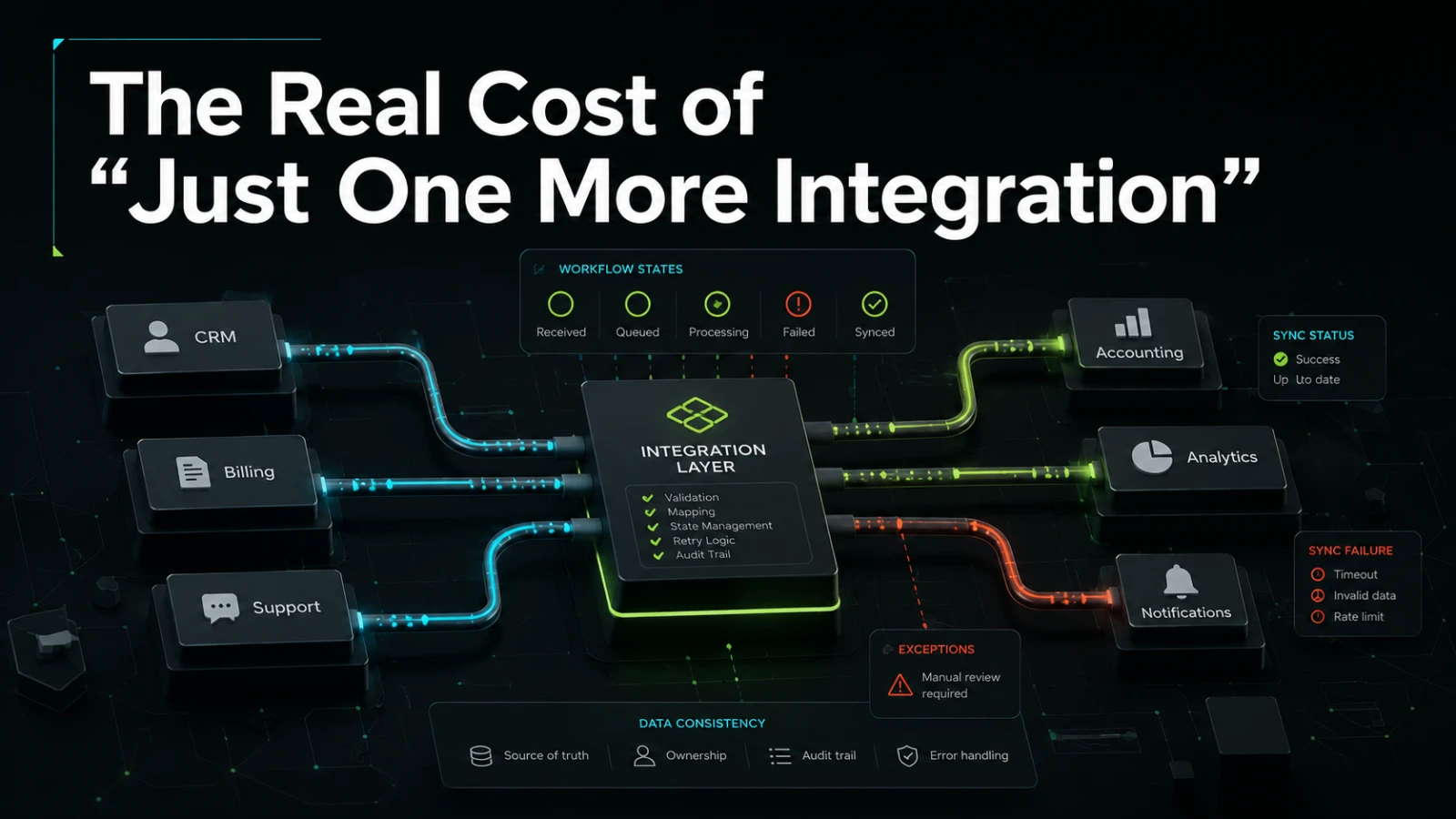
It rarely starts as a platform decision. A customer asks for data to sync with their CRM. Finance wants invoices pushed into accounting software. Operations needs a spreadsheet replaced with an internal dashboard. Sales wants a form connected to a notification channel. Each request sounds reasonable on its own.
The problem is not the first integration. The problem is treating every new integration as a small technical task instead of a change to the business workflow. “Just one more integration” can add hidden cost across maintenance, data ownership, security, support, and future delivery speed.
The visible cost is only the beginning
The visible cost of an integration is usually easy to explain: connect one system to another, map a few fields, trigger an action, and test the result.
That is the part teams tend to estimate.
The real cost appears after the first version is live. Someone must understand which system owns the data. Someone must handle failed syncs. Someone must explain why records do not match. Someone must update the integration when the workflow changes. Someone must decide whether a manual correction should overwrite automated data.
These are not edge cases. They are normal operating conditions in B2B systems.
A useful integration does not only move data. It changes how a team trusts data, corrects errors, makes decisions, and explains what happened.
What teams usually underestimate
Most rushed integrations fail in predictable ways. They are not always technically broken. They are often operationally unclear.
Common blind spots include:
Unclear source of truth: two systems can edit the same customer, order, ticket, or invoice record.
Weak error handling: failed actions are hidden in logs instead of visible to the team that owns the workflow.
No retry strategy: temporary API issues create permanent gaps.
Poor data mapping: fields look similar but carry different business meaning.
Missing audit trail: nobody can easily see who changed what, when, and why.
Manual workarounds: teams still export, copy, paste, or reconcile data by hand.
Unowned maintenance: the original developer understood the integration, but the business now depends on it.
Over-automation: exceptions that need human judgment are forced through rigid rules.
This is why a technically simple connector can become expensive. The integration may be small, but the workflow around it is not.
A connector is not the same as a workflow
Many businesses start by asking, “Can we connect Tool A to Tool B?”
A better first question is, “What decision or action should become more predictable after these systems are connected?”
The difference matters.
A connector transfers information. A workflow defines states, responsibilities, exceptions, and outcomes.
For example, sending a new lead from a web form into a CRM is a connector. Deciding what happens when the lead is incomplete, duplicated, assigned to the wrong team, or missing consent is a workflow problem.
The workflow questions usually determine whether the integration will reduce manual work or simply move the mess into another system.
The hidden cost areas
The cost of another integration tends to spread across several parts of the business.
Cost area | What changes | Why it matters |
|---|---|---|
Ownership | Someone must own data rules, failures, and changes | Without ownership, issues become support noise |
Data quality | Field mapping, validation, duplicates, and missing values need rules | Poor data quality reduces trust in reports and automation |
Workflow state | Teams need to know whether an item is pending, synced, failed, approved, or blocked | Clear state makes work easier to inspect |
Security | Credentials, permissions, and access scopes must be managed | Integrations can expand system access if not designed carefully |
Support | Users need a path to report and resolve sync issues | Hidden failures create rework and confusion |
Change cost | Any workflow or vendor change may affect the integration | Shortcuts can make later changes slower |
Monitoring | Failures need visibility beyond developer logs | Operational teams need to know when something needs attention |
Documentation | Future maintainers need to understand the business logic | Missing context increases delivery risk |
The technical build is only one line in the real cost model.
Manual process, simple automation, or dependable system?
Not every integration needs to become a full internal platform. Some workflows are low-risk and can stay manual. Others can be handled with simple automation. Some deserve a more dependable system because errors are costly, frequent, or hard to detect.
Approach | Manual effort | Visibility | Audit trail | Change cost | Best fit | Main trade-off |
|---|---|---|---|---|---|---|
Manual process | High | Often low | Usually weak | Low at first, higher as volume grows | Rare, low-risk tasks | Depends on people remembering each step |
No-code automation | Low to medium | Varies by tool | Limited or tool-specific | Can increase when logic spreads across tools | Simple triggers and notifications | Easy to start, harder to govern at scale |
Direct API integration | Low once built | Depends on implementation | Can be designed properly | Medium | Clear data movement between known systems | Needs ownership, monitoring, and maintenance |
Internal workflow tool | Lower for repeated work | High if designed well | Strong if included from the start | Medium to high upfront, lower for recurring changes | Repeated approvals, operations, exceptions, and status tracking | Requires clearer scope and product decisions |
Custom B2B platform | Depends on scope | High if modeled well | Strong if modeled well | Higher upfront | Core business workflows, partner portals, client-facing systems | More responsibility, but better control |
The right answer depends on workflow frequency, business risk, data sensitivity, and how often the process changes.
A monthly export may not need custom software. A daily approval flow across sales, operations, finance, and customer support probably needs more than a quick connector.
The integration questions that prevent rework
Before adding another integration, it helps to answer a few practical questions in plain business language.
What is the source of truth?
For each important object, define which system owns the record.
Examples:
Customer profile
Contract status
Invoice status
Support ticket
Order record
Product availability
Approval state
If two systems can update the same record, define conflict rules before building. Otherwise, the integration may create silent data fights.
What should happen when something fails?
Every real integration fails sometimes. A required field is missing. An API is unavailable. A permission expires. A duplicate record appears. A user edits data during a sync.
The key question is not whether failure can happen. It is whether the team can see it, understand it, and recover from it.
A dependable integration usually needs:
visible error states
retry rules
manual override paths
clear ownership
enough context for support
a way to avoid duplicate actions
Without this, the business may believe work is automated while people are quietly fixing the same problems manually.
Which exceptions should stay manual?
Automation is useful when the rules are clear. It becomes risky when every exception needs judgment but the system is forced to act anyway.
Some decisions should stay manual, especially when they involve commercial judgment, unusual customer requests, sensitive data, or unclear responsibility.
Good integration design does not remove people from the workflow blindly. It removes unnecessary handoffs and gives people better information when judgment is needed.
Why integrations become technical debt
An integration becomes technical debt when it is hard to understand, risky to change, or disconnected from the way the business actually works.
This often happens when teams build around immediate requests instead of a shared model of the workflow.
For example:
one automation updates the CRM
another sends a finance notification
another writes to a spreadsheet
another triggers an email
another creates a task
nobody can see the full state of the process
Each piece may work alone. Together, they create a fragile system where the business process is scattered across tools, scripts, inboxes, and tribal knowledge.
That is when “just one more integration” starts slowing the team down.
What a more dependable integration looks like
A dependable integration is not necessarily complex. It is easier to reason about in production.
It usually has a few clear qualities:
Defined ownership: the business knows who owns the workflow and who owns the technical maintenance.
Explicit states: records are not just “sent” or “not sent”, they may be pending, synced, failed, blocked, cancelled, or manually resolved.
Clear data contracts: fields have agreed meaning, not just matching names.
Operational visibility: the right team can see failures without asking a developer to inspect logs.
Safe retries: temporary failures do not create duplicate records or repeated customer messages.
Change awareness: future workflow changes have a known place to be implemented.
Documentation: the integration can be maintained by someone who did not build the first version.
This is where product-grade thinking matters. The goal is not to over-engineer every connector. The goal is to build enough structure that the integration remains useful after the initial request is complete.
When “one more integration” is the right move
Sometimes the additional integration is absolutely worth it.
It may reduce repeated manual work, remove duplicate data entry, shorten response times, improve reporting, or make handoffs clearer. The business case can be strong when the workflow is frequent, well-understood, and painful enough to justify the implementation and maintenance cost.
The warning sign is not integration itself. The warning sign is adding integration without scoping the operational responsibility behind it.
Before building, define:
what business outcome should improve
which workflow steps are in scope
which system owns which data
how failures will be surfaced
who can correct errors
what should be logged
what should remain manual
how future changes will be handled
This turns the integration from a task into a controlled software decision.
When to involve a software partner
A software partner becomes useful when the integration touches more than one tool and more than one team.
That is usually where the question shifts from “Can we connect this?” to “What should the system become?”
For a founder, this may mean scoping the first useful version of a platform without building too much too early. For an operations lead, it may mean replacing spreadsheet-driven work with a controlled internal tool. For a CTO or technical lead, it may mean reducing delivery risk by designing clearer boundaries, queues, permissions, and support paths.
If this is the kind of system you are trying to make dependable, Aptenova can help assess the workflow, risk, and first practical build.
Conclusion
“Just one more integration” is rarely just one more technical task.
It can change who owns data, how errors are handled, how teams trust reports, how support works, and how expensive future changes become. The safest approach is not to avoid integrations. It is to treat them as workflow decisions with technical consequences.
Before adding another connector, define the source of truth, expected states, failure paths, manual exceptions, and ownership model. That small amount of clarity can prevent a useful automation from becoming another fragile part of the stack.
Put it into practice
Working through a similar problem?
Tell us about your product and the change you need. We can discuss a focused feature, a new integration, an AI workflow or a first release.