
Custom Software vs SaaS: When Buying Tools Starts Slowing You Down
May 14, 2026
SaaS tools are often the right starting point, but too many disconnected tools can create hidden operational drag. This article explains when buying software is still sensible, when custom software becomes more practical, and what teams should define before building.
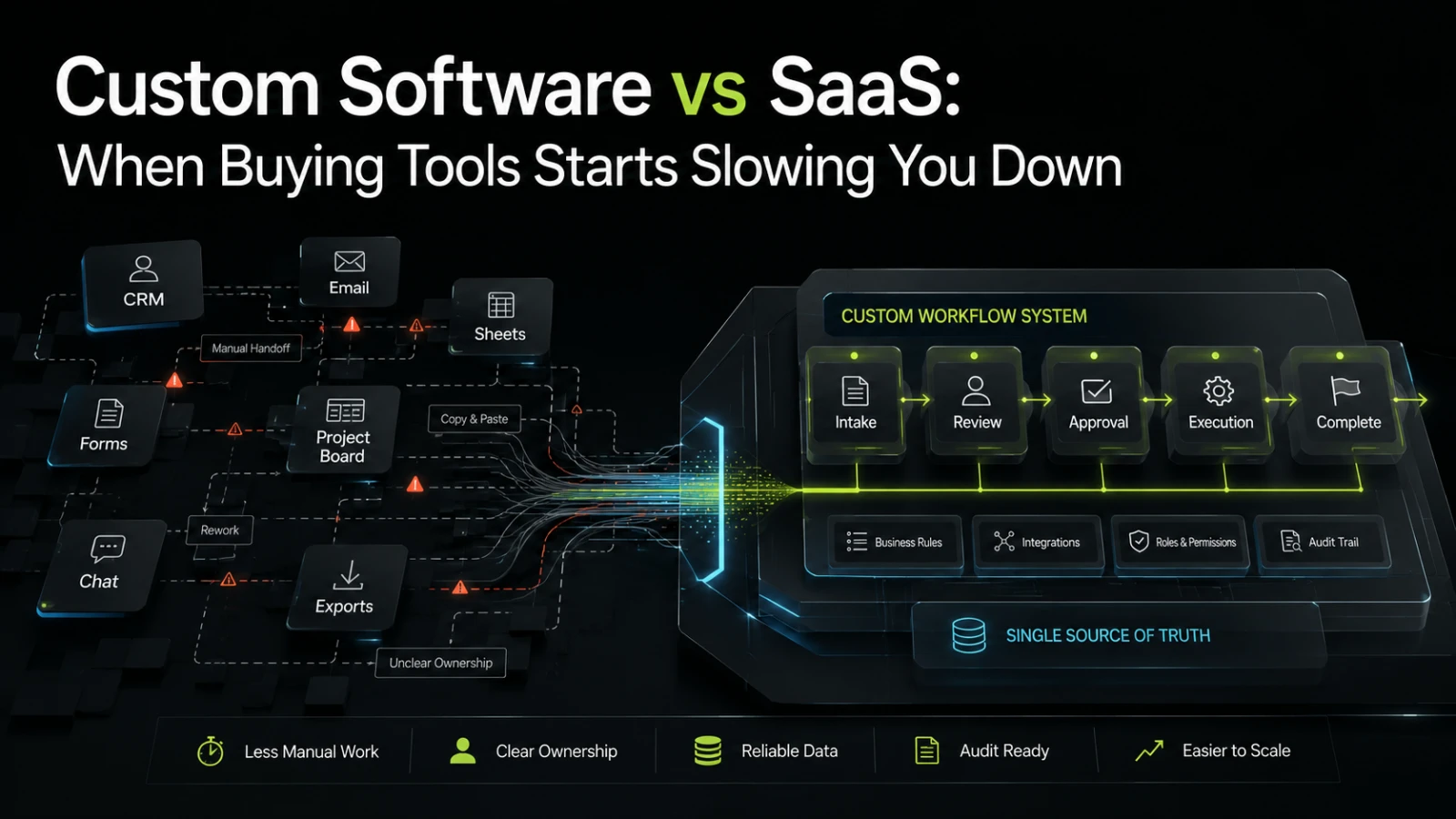
SaaS is often the fastest way to solve a business problem. You can subscribe, configure, invite the team, and move work out of spreadsheets or inboxes quickly. For many teams, that is the correct first move.
The problem starts when the tool stack grows faster than the workflow. A CRM handles part of the customer journey. A form tool collects requests. A project board tracks delivery. A spreadsheet calculates exceptions. Slack carries approvals. Someone exports data every Friday because two systems do not agree. At that point, the issue is no longer whether SaaS is good or bad. The issue is whether your operating model has outgrown disconnected tools.
The real trade-off is not SaaS versus custom software
The practical question is this:
Are you buying tools that support the way your business works, or are you reshaping your business around tools that were not designed for your workflow?
SaaS is valuable when the process is common, the workflow is stable, and the cost of adapting your team to the tool is lower than building something specific. Accounting, payroll, email, analytics, customer support, and basic CRM workflows are often good examples.
Custom software becomes relevant when the business process itself is a source of operational advantage, cost pressure, or delivery risk. This often happens in B2B operations where work moves across multiple departments, systems, permissions, approval rules, customer-specific logic, or data sources.
The mistake is treating custom software as “more expensive SaaS.” It is not. It is a different type of investment. Done well, it turns a repeated workflow into a system your team can inspect, operate, change, and improve over time.
Signs your SaaS stack is becoming operational drag
A growing tool stack does not automatically mean you need custom software. But certain patterns are strong signals that the current approach is reaching its limits.
Common signs include:
The same data is entered into multiple systems.
People rely on exports, imports, copy-paste steps, or shared spreadsheets to keep work moving.
The real workflow lives in messages, comments, and undocumented exceptions.
Managers cannot easily see the current state of work without asking several people.
Approvals happen outside the system that records the final decision.
Reporting requires manual cleanup before anyone trusts it.
Tool permissions are too broad because the SaaS product does not match your roles.
A small process change requires updates in several tools and team retraining.
Nobody clearly owns the full workflow end to end.
These issues are not just inconvenient. They create coordination cost. They make onboarding harder. They increase rework. They make accountability vague. They also make automation harder because the system does not have one clear version of the workflow state.
Where SaaS usually works well
Buying a tool is often the right decision when the workflow is standard and the tool already fits most of your needs.
SaaS usually works well when:
The process is not unique to your business.
You do not need deep integration with internal systems.
The cost of manual work is low or temporary.
The tool’s reporting is good enough for decision-making.
The workflow can follow the tool’s structure without damaging operations.
Your team can maintain the setup without technical dependency.
Switching tools later would not create major business risk.
In these cases, custom software may add unnecessary complexity. A custom system needs design decisions, development, testing, hosting, security considerations, documentation, and ongoing ownership. If the problem is already solved well by an existing product, buying is usually more practical.
Where custom software starts making sense
Custom software becomes more relevant when the workflow is specific, repeated, and expensive to coordinate manually.
This does not always mean building a large platform. Often, the better first step is a focused internal tool, integration layer, workflow engine, customer portal, admin system, or automation around a painful part of the process.
Custom software may be worth considering when:
Your team repeats the same operational process many times per week.
The process crosses multiple tools, teams, or approval stages.
Errors create financial, compliance, customer, or delivery consequences.
Work status is hard to inspect.
Exceptions are common and need structured handling.
Your SaaS tools do not support your business rules.
Reporting depends on manual reconciliation.
You need customer-specific workflows or permissions.
The process is important enough that owning it creates long-term value.
The key is not to build everything. The key is to identify where a dependable system would reduce manual effort, improve visibility, and make the workflow easier to reason about in production.
Generic SaaS vs custom workflow system
Decision area | Generic SaaS | Custom software |
|---|---|---|
Best fit | Common business processes | Specific workflows with business-specific rules |
Setup speed | Usually faster to start | Slower to start, but more precise |
Manual effort | Low if the workflow matches the tool | Lower when repetitive handoffs are designed into the system |
Visibility | Limited to the tool’s model | Can reflect the actual workflow state |
Audit trail | Depends on product features | Can be designed around approvals, changes, and ownership |
Integration risk | Increases when many tools must stay in sync | Depends on architecture and integration quality |
Change cost | Low for simple configuration, higher when workarounds multiply | Higher upfront, but clearer when ownership and scope are defined |
Maintenance | Vendor handles product maintenance | Your team or partner must maintain the system |
Main trade-off | You adapt to the product | The product must be designed and maintained responsibly |
The table shows why the decision is not about which option is universally better. SaaS reduces ownership burden. Custom software increases ownership but can reduce operational friction when the workflow matters enough.
What teams usually get wrong
The most common mistake is waiting until the tool stack is already messy, then trying to replace everything at once.
That creates unnecessary risk. A better approach is to isolate the part of the workflow that causes the most repeated effort or uncertainty. For example, the problem may not be “we need a new platform.” It may be “we need one reliable place to track intake, approval, assignment, status, exceptions, and completion.”
Another mistake is automating a broken process too early. If nobody can explain the rules clearly, software will not fix the confusion. It may only make the confusion faster.
Before building, define:
What starts the workflow?
What states can the work move through?
Who owns each state?
What decisions require approval?
What data must be captured once and reused?
Which systems need to exchange information?
What should happen when something fails?
What must be visible to managers, operators, customers, or partners?
What should remain manual because human judgment is still needed?
This level of clarity is often more valuable than a long feature list.
AI does not remove the need for workflow clarity
AI-assisted workflows can help with classification, summarization, drafting, data extraction, routing, and internal assistance. But AI performs better when the surrounding system has clear data, permissions, states, and review points.
If the current workflow is scattered across inboxes, spreadsheets, and loosely connected tools, adding AI may create another layer of inconsistency. It can speed up tasks, but it does not automatically create ownership, auditability, or reliable process state.
A practical AI-augmented system still needs conventional software foundations: clear inputs, business rules, integrations, user roles, logging, review flows, and fallback paths when automation is uncertain.
A practical way to decide
A useful decision process is to ask what kind of problem you are solving.
If the problem is access to a standard capability, buy SaaS.
If the problem is repeated coordination across people, tools, data, and business rules, consider custom software.
If the problem is unclear ownership, inconsistent process, or missing operational definitions, do not build yet. First, map the workflow.
A simple decision path can help:
Situation | Better next step |
|---|---|
We need a common capability quickly | Buy or configure SaaS |
We need a temporary process for a small team | Use SaaS or a spreadsheet with clear ownership |
We repeat the same manual process often | Scope automation or an internal tool |
Work moves across several disconnected tools | Assess integrations or a custom workflow layer |
Reporting is not trusted because data is inconsistent | Define the source of truth before building |
The process is business-critical and specific to us | Consider custom software with phased delivery |
We cannot explain the process clearly | Map the workflow before selecting tools |
Start with the first useful version
Custom software does not need to begin as a large build. In many cases, the best first version is narrow.
It might include:
A structured intake form.
A simple admin panel.
A workflow status model.
Role-based task assignment.
Integration with one or two existing systems.
Automated notifications for specific events.
A basic audit trail.
Reporting based on one source of truth.
The first useful version should reduce real operational pain without trying to replace every system immediately. It should also test the assumptions behind the workflow. Once the team sees the system in daily use, the next priorities become clearer.
This is where technical delivery discipline matters. A rushed internal tool can become another fragile system. A dependable one needs sensible architecture, readable business logic, error handling, permissions, deployment discipline, and a plan for maintenance.
When to talk to a software partner
It is worth speaking to a technical partner when the business problem is clear but the software path is not. That might mean deciding whether to integrate existing tools, build a focused internal tool, replace a spreadsheet-heavy process, or create a first version of a B2B platform.
A good conversation should clarify scope, risks, dependencies, data flows, operational ownership, and what should not be built yet.
If this resembles a workflow inside your business, Aptenova can help assess the workflow, risk, and first practical build.
Conclusion
SaaS is often the right starting point. It reduces setup time, avoids unnecessary ownership, and gives teams access to mature product features quickly.
But when buying more tools starts creating more handoffs, unclear ownership, duplicated data, and manual reconciliation, the cost has shifted. The business may not need another subscription. It may need a clearer workflow, a better source of truth, and software designed around how the operation actually runs.
The right decision is rarely “buy everything” or “build everything.” The better question is where your team needs standard capability and where it needs dependable, business-specific workflow control.
Put it into practice
Working through a similar problem?
Tell us about your product and the change you need. We can discuss a focused feature, a new integration, an AI workflow or a first release.