
The Architecture Behind Client Portals That Stay Reliable
May 16, 2026
A reliable client portal is not just a login screen and a dashboard. It needs clear workflow state, secure access, dependable integrations, useful notifications, and an architecture that supports real operational use after launch.
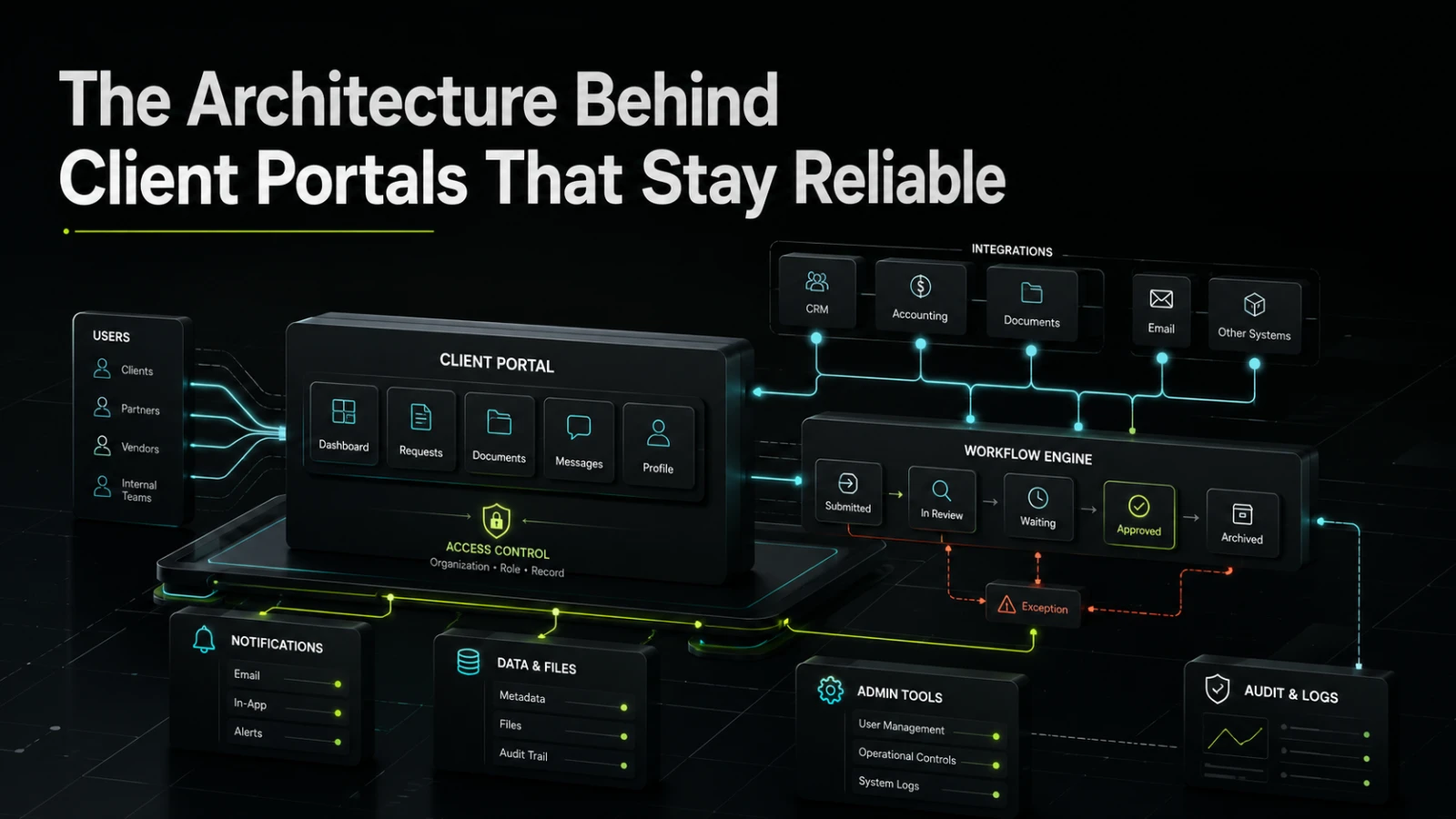
A client portal often starts as a simple request: give customers, partners, vendors, or internal stakeholders a place to log in, see information, upload files, track progress, and communicate without endless email threads. The first version may look straightforward. The difficult part is making it reliable when real users, real deadlines, changing data, and operational exceptions enter the system.
Reliable client portals are not built around screens first. They are built around workflow state, access rules, data ownership, integration boundaries, and supportability. The interface matters, but the architecture behind it determines whether the portal reduces manual work or becomes another fragile system the team has to monitor.
A client portal is usually an operations system
Many teams describe a client portal as a customer-facing product, but in practice it often sits between several operational functions. Sales may use it for onboarding. Operations may use it to request documents. Finance may use it to share invoices or payment status. Support may use it to manage questions. Leadership may want visibility into progress and bottlenecks.
That means the portal is rarely just a frontend. It has to coordinate work across users, roles, systems, and events.
A dependable portal usually needs to answer questions such as:
Who can see this record?
What stage is this request in?
What happens when a file is uploaded?
Which system owns the source data?
Who gets notified, and when?
What should happen if an integration fails?
How can the team audit what changed?
When these questions are not answered early, the build may still look polished, but it becomes hard to operate. Users see outdated statuses. Staff duplicate work in spreadsheets. Support teams chase missing context. Developers struggle to change one part of the workflow without breaking another.
What teams usually get wrong
The most common mistake is treating the portal as a collection of pages instead of a controlled workflow.
A page-first approach can produce a usable demo quickly. There is a login page, a dashboard, a document area, a profile screen, and a message form. But behind those screens, the system may not have a clear model for state, permissions, or process ownership.
That creates several problems.
First, business logic gets scattered. A rule about whether a client can upload a document may live in the frontend, another rule may live in the backend, and a third may be handled manually by an operator. This makes the portal harder to test and harder to trust.
Second, permissions become too broad or too vague. A portal serving multiple client companies, departments, or partner groups needs strict boundaries. “Logged in user” is not enough. The system often needs organization-level access, role-based permissions, record-level visibility, and sometimes delegated access.
Third, integrations are treated as simple data pulls. In reality, a portal may need to read from a CRM, write to an accounting system, sync document metadata, send notifications, or trigger approval workflows. Each integration adds failure modes. A dependable architecture has to make those failures visible and recoverable.
Shortcut implementation vs dependable portal architecture
The difference between a fragile portal and a dependable one is often not visible in the first demo. It appears after the first few months of real use.
Area | Shortcut implementation | Dependable architecture | Operational consequence |
|---|---|---|---|
Workflow state | Status text updated manually | Defined states, transitions, and ownership | Easier to inspect what is waiting, blocked, or complete |
Permissions | Basic user roles | Organization, role, and record-level access rules | Lower risk of exposing the wrong data |
Integrations | Direct calls from user actions | Controlled sync, retries, logs, and failure handling | Fewer hidden failures and less manual checking |
Notifications | Emails sent from form submissions | Event-based notifications with clear triggers | Better timing and less duplicated communication |
Files | Generic uploads | File type rules, ownership, metadata, and audit trail | Easier review, search, and compliance support |
Admin tools | Developer-only changes | Internal controls for common operational changes | Lower support burden after launch |
Reporting | Dashboard added late | Data model designed for visibility | More useful operational insight |
The goal is not to over-engineer the first version. The goal is to avoid architectural gaps that are expensive to repair once clients depend on the portal.
Start with workflow state, not screens
A reliable client portal needs a clear state model. This is especially important when the portal manages onboarding, approvals, service delivery, document review, support requests, project milestones, or account updates.
A weak state model uses vague labels such as “active,” “pending,” or “complete” without defining what they mean. A stronger model defines what can happen at each stage.
For example, a client onboarding workflow might include:
Draft
Submitted
In review
Waiting for client
Approved
Rejected
Archived
Each state should have clear rules. Who can move the workflow forward? What data is required before submission? Can the client edit after review starts? What happens if an operator rejects a document? Does rejection move the full onboarding record backward, or only one requirement?
These details may feel small during scoping, but they control the day-to-day reliability of the system. A portal with clear state is easier for users to understand and easier for operators to manage. It also gives technical teams a better foundation for testing, reporting, and future automation.
Permissions need more than “admin” and “user”
Client portals often deal with sensitive operational data. Even when the data is not legally sensitive, it may still be commercially sensitive: contracts, pricing, project status, internal notes, uploaded documents, invoices, support history, or partner information.
A dependable permissions model should usually consider four layers.
The first layer is identity: who is the user?
The second is organization: which client, vendor, partner, or account does the user belong to?
The third is role: what is the user allowed to do within that organization?
The fourth is record access: should this specific user see this specific item?
This matters when a client has multiple offices, departments, brands, regions, or user types. It also matters when external users and internal staff work in the same portal. Internal notes, review decisions, and operational controls should not accidentally appear in client-facing views.
Reliable access control is easier when it is designed into the data model early. Retrofitting it later can create high implementation risk because every existing screen, endpoint, report, and file rule may need review.
Integrations should be designed around failure
Many portals become unreliable because integrations are treated as if they will always work. They will not.
A CRM may be unavailable. An accounting system may reject a payload. A file processing service may time out. A user may update data in two systems at nearly the same time. An API response may change. A scheduled sync may fail without anyone noticing.
A dependable portal architecture does not assume perfect integrations. It defines how data moves, what system owns each field, how conflicts are handled, and how failures are surfaced.
For important workflows, direct real-time integration is not always the right choice. Some actions are better handled through queued jobs, background sync, or staged review. This can make the system easier to reason about in production because user actions are separated from slower external dependencies.
The practical questions are simple:
Does the user need an instant result, or only confirmation that the request was received?
What should the portal show if the external system is unavailable?
Can the operation be retried safely?
Who should be alerted when sync fails?
Is there an admin view for resolving stuck records?
Answering these questions prevents the portal from becoming a black box.
Notifications are part of the architecture
Notifications are often added late, but they shape the user experience and the operational workload.
A poor notification system sends too many messages, sends them at the wrong time, or fails to explain what action is needed. Users ignore the emails. Staff return to manual follow-up. The portal no longer reduces coordination effort.
A better approach is event-based. The system defines meaningful events, such as document submitted, review completed, approval required, payment status changed, or message received. Each event has clear recipients, timing, and content.
This also helps avoid duplicated communication. If a user already has a dashboard task, an email reminder, and an internal staff notification, the team should know why each one exists. Otherwise the portal creates more noise instead of clearer ownership.
Admin tools keep the portal maintainable
A client portal needs internal controls, not only client-facing screens. Many early builds forget this.
If every small operational change requires a developer, the system becomes expensive to run. But if internal users can change too much without guardrails, the portal may become inconsistent.
Good admin tools usually focus on repeatable operational needs:
Updating workflow status
Reviewing submitted data
Managing client users
Re-sending invitations
Viewing integration errors
Adjusting non-critical configuration
Searching records across clients
Exporting operational data where appropriate
The admin side does not need to be large in the first release. It does need to match the support model. Someone inside the business must be able to answer, “What happened to this request?” without reading logs or asking a developer.
What to define before building
Before designing screens or choosing a framework, teams should define the operational shape of the portal.
A practical discovery process should clarify:
The main users and their roles
The workflow stages and state transitions
The source of truth for each important data type
The systems that need to connect
The actions that must be audited
The notification events that matter
The internal admin controls required for launch
The failure cases that need visible handling
The first useful version, not the imagined final platform
This keeps the first build focused. A portal does not need every feature at launch. It does need enough architectural structure to support real work without immediate rework.
Where AI-assisted workflows can fit
AI can be useful inside a client portal, but it should be applied carefully. The best opportunities are usually around reducing repetitive interpretation or preparation work, not replacing workflow ownership.
Examples may include summarizing client submissions for internal review, drafting response suggestions, classifying support requests, extracting structured fields from uploaded documents, or identifying missing information before an operator starts review.
These features still need human oversight, permissions, logging, and clear fallback paths. AI assistance should make the workflow easier to operate. It should not make decisions harder to audit or explain.
For many businesses, the right first step is not an AI-heavy portal. It is a dependable workflow system with a few carefully scoped AI-assisted tasks where they reduce repeated manual effort.
When to talk to a software partner
A client portal is worth deeper technical planning when it touches several systems, manages sensitive information, coordinates repeated operational work, or needs to support multiple client organizations.
It is also worth reviewing carefully when the current process depends on spreadsheets, inboxes, shared folders, manual status updates, or staff memory. These are signs that the workflow may need a clearer system of record.
If this is the kind of system you are trying to make dependable, Aptenova can help assess the workflow, risk, and first practical build.
Conclusion
Reliable client portals are not reliable because they have polished dashboards. They are reliable because the architecture supports real operational use: clear state, controlled permissions, dependable integrations, useful notifications, visible failures, and internal tools that reduce support friction.
The practical path is to start with the workflow, define the data ownership, design for exceptions, and build the first version around the work that actually needs to happen. That approach gives the portal a better chance of becoming a dependable part of the business instead of another system people work around.
Put it into practice
Working through a similar problem?
Tell us about your product and the change you need. We can discuss a focused feature, a new integration, an AI workflow or a first release.