
Admin Panels Are Strategic Software, Not Back-Office Decoration
May 16, 2026
Admin panels are often treated as secondary screens for internal users. In practice, they shape workflow quality, data control, auditability, support speed, and operational risk. This article explains how to scope admin software as a strategic system, not a late-stage interface.
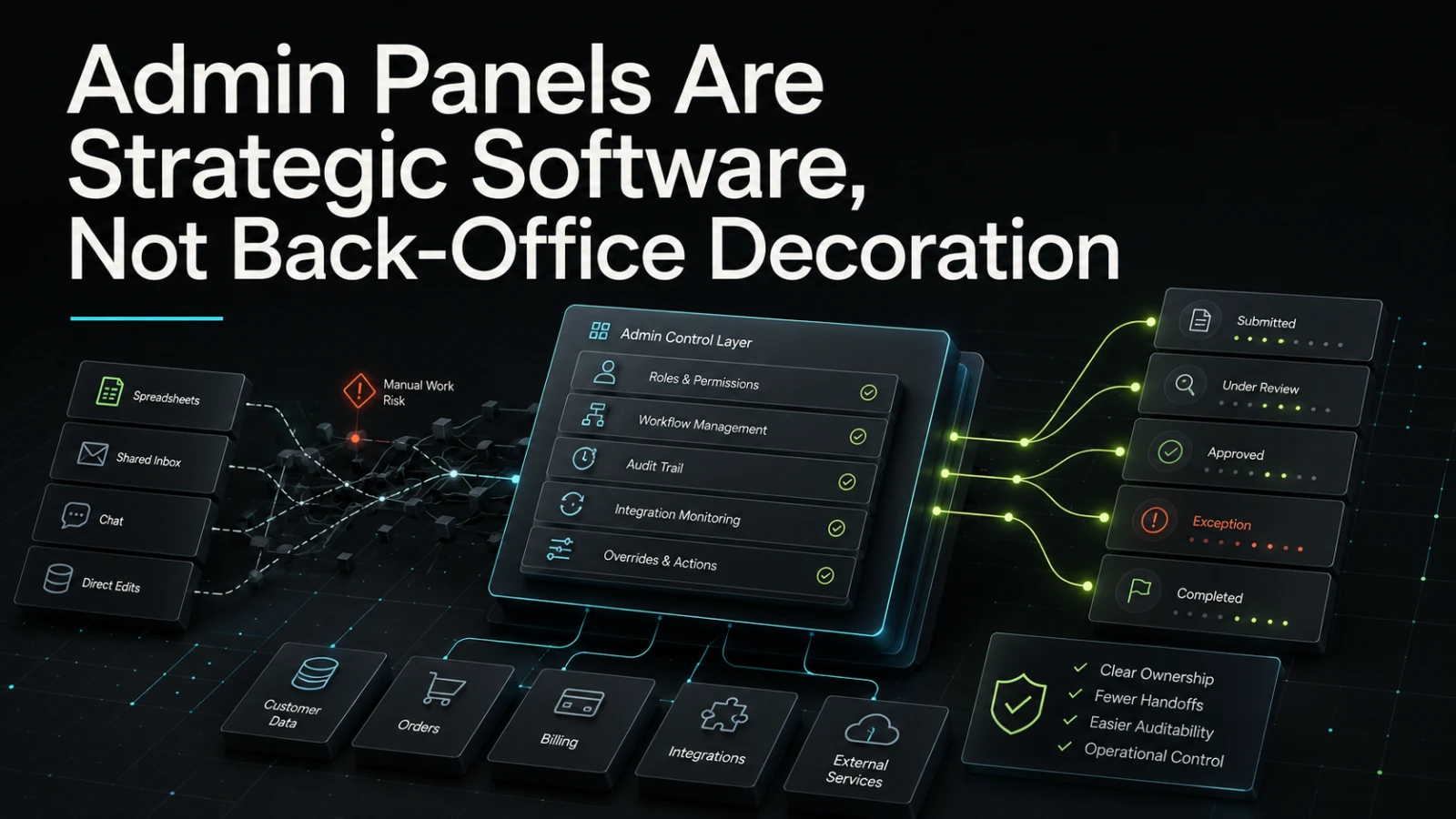
Admin panels are often discussed as if they are just back-office screens: a place to edit records, check orders, manage users, or “fix things” when the public product does not cover an edge case. That mindset is risky. In many B2B systems, marketplaces, platforms, logistics tools, service businesses, and workflow-heavy products, the admin panel is where the real operation becomes visible.
A well-designed admin panel is not decoration. It is the control surface for business processes, exceptions, permissions, data quality, approvals, and recovery. When it is treated as an afterthought, teams usually pay for it later through manual work, unclear ownership, support bottlenecks, fragile workarounds, and higher implementation risk.
The admin panel is where operations meet software
Customer-facing software is often designed around the clean path: sign up, submit a request, place an order, approve a quote, complete a payment, download a report. Real operations are messier.
An internal team may need to:
Review incomplete submissions
Correct data entered by customers or partners
Move work between statuses
Resolve failed integrations
Handle exceptions that should not be exposed to customers
Apply permissions by role, region, team, or account
Trace who changed what and when
Pause, retry, approve, reject, or escalate a process
These are not cosmetic needs. They are workflow needs. If the admin panel does not support them clearly, the business usually falls back to spreadsheets, shared inboxes, database edits, chat messages, or undocumented developer intervention.
That may work for a short period. It rarely scales cleanly.
What teams usually get wrong
The most common mistake is scoping the admin panel as “CRUD screens” only. Create, read, update, delete functionality is useful, but it is not the same as operational software.
A basic admin panel can expose data. A strategic admin system helps people make decisions, move work forward, and understand consequences.
Typical rushed decisions include:
Building generic edit screens without modelling workflow state
Giving broad permissions because role design was postponed
Hiding important context across separate tabs or tools
Treating audit logs as optional
Adding manual overrides without guardrails
Ignoring failed jobs, retries, and integration errors
Building search and filters too late
Designing only for developers, not for the actual operators
These shortcuts often look cheaper during the first build. The cost appears later when support teams cannot answer customer questions, operators cannot see why a process is blocked, and developers become the fallback admin layer.
If an internal user needs to ask a developer what happened, the admin panel may be missing part of its job.
Decorative admin vs strategic admin
The difference is not visual polish. It is whether the system supports the actual decisions and responsibilities of the team using it.
Area | Decorative admin panel | Strategic admin software |
|---|---|---|
Main purpose | Edit records | Manage workflow state and exceptions |
User model | One or two broad admin roles | Clear permissions based on responsibility |
Data visibility | Raw fields and database-like views | Context, history, status, ownership, and next actions |
Audit trail | Minimal or missing | Important changes are traceable |
Error handling | Hidden in logs or support tickets | Failed steps can be inspected and often retried safely |
Operational fit | Works when volume is low | Supports repeated work and handoffs |
Change cost | Increases as exceptions grow | Easier to adapt because process boundaries are clearer |
Main trade-off | Faster initial screen creation | Requires better workflow thinking upfront |
The strategic version does not need to be large. In many cases, a small, focused internal tool is enough. The important question is whether it reflects how the business actually operates.
Admin panels reduce risk when they make state visible
Many operational problems are state problems.
A request is not simply “created.” It may be draft, submitted, under review, waiting for documents, approved, rejected, expired, cancelled, fulfilled, or disputed. An order may be paid but not synced. A customer may be verified but missing a required agreement. An integration may have accepted the first step but failed the second.
If these states are not clearly represented, the team invents its own language outside the system. One person says “pending,” another says “stuck,” another says “needs review.” Soon the admin panel no longer reflects reality.
Good admin software makes state easier to reason about in production. It shows what is happening now, what happened before, who owns the next step, and what actions are safe.
This matters for both business and engineering teams. Operators get fewer ambiguous handoffs. Technical teams get fewer emergency questions and fewer risky manual interventions.
Permissions are product design, not just security
Permissions are often treated as a technical checklist: admin, manager, user. For simple systems, that may be enough. For B2B operations, it often is not.
An admin panel may need to answer questions such as:
Who can approve a high-risk change?
Who can view sensitive customer or financial data?
Who can retry a failed integration?
Who can override pricing, limits, status, or access?
Should support users edit data, or only request changes?
Should partner users see all records or only their own accounts?
Which actions require a reason, review, or audit entry?
This is not only about preventing misuse. It is about making responsibility clear. When permissions match operational ownership, teams can move faster without giving everyone unrestricted access.
Poor permission design creates two opposite risks. Either too many people can do too much, or only developers can perform necessary actions. Both slow the business down in different ways.
Auditability changes how confidently teams operate
Audit trails are easy to postpone because they do not feel urgent during a prototype. But once real users, real customers, real money, or regulated workflows are involved, traceability becomes operationally important.
Not every system needs heavy compliance features. Many teams simply need practical answers:
Who changed this status?
Why was this record rejected?
When was this customer notified?
Was this value changed by a person, an automation, or an integration?
Did the retry succeed?
What was the previous value?
A useful audit trail does not have to capture everything at the same level of detail. It should capture the decisions and changes that matter to the business. That may include status transitions, permission changes, payment-related updates, manual overrides, communication events, and integration retries.
The goal is not bureaucracy. The goal is fewer blind spots.
Generic tools can help, but they have limits
Many businesses start with spreadsheets, no-code tools, shared dashboards, or generic admin templates. That can be a sensible first step when the workflow is still changing or the volume is low.
The risk appears when a generic tool becomes the unofficial operating system of the company.
Approach | Manual effort | Visibility | Audit trail | Integration risk | Best fit | Main trade-off |
|---|---|---|---|---|---|---|
Spreadsheet workflow | High | Depends on discipline | Weak | Often manual | Early exploration | Fast to start, easy to outgrow |
Generic admin template | Medium | Good for records | Limited unless extended | Depends on setup | Simple data management | May miss workflow logic |
No-code internal tool | Low to medium | Often useful | Varies by platform | Can increase with complexity | Lightweight operations | Ownership and scaling need care |
Custom admin software | Lower when scoped well | Designed around the process | Can be built around key events | Controlled but requires planning | Repeated, business-specific workflows | Higher upfront thinking |
The point is not that every team needs custom software immediately. The point is that internal tools should match the operational risk and workflow complexity they are carrying.
If the admin layer controls customer outcomes, financial decisions, fulfilment, approvals, or critical data, it deserves proper product thinking.
What to define before building
Before designing screens, define the workflow. This is where many admin projects become clearer and smaller.
A practical scoping exercise should answer:
What work is repeated?
Repeated manual work is usually a better automation candidate than rare edge cases.What states can each record be in?
Status design should reflect real business stages, not only database convenience.Who owns each action?
Ownership helps define roles, permissions, notifications, and escalation paths.What should be impossible?
Good admin software prevents unsafe actions, not only enables valid ones.What needs an audit trail?
Capture meaningful changes, especially decisions, overrides, and sensitive updates.Where do integrations fail?
Failed external calls, sync issues, and retries should not be invisible.Which actions need human judgement?
Not everything should be automated. Some decisions should stay manual but become easier to review.
This approach keeps the build practical. Instead of asking for “an admin panel,” the team scopes a workflow control system with clear responsibilities.
AI-assisted workflows still need admin discipline
AI can support internal operations by summarising records, suggesting classifications, drafting responses, extracting information, or identifying likely next actions. But AI-assisted workflows need even clearer admin design, not less.
Human review, confidence indicators, override controls, and traceable decisions become important. The admin panel may need to show what was suggested, what was accepted, what was changed, and who approved the final action.
The useful question is not “can AI automate this?” The better question is: “Which part of this workflow can be assisted safely, and how will the team inspect, correct, and own the result?”
That is where admin software becomes especially strategic. It gives the business a controlled place to combine automation, human judgement, and operational accountability.
When an admin panel deserves serious product attention
An admin panel should be treated as strategic software when it affects:
Customer support quality
Order, booking, fulfilment, or service delivery
Approval flows
Partner or vendor operations
Account configuration
Billing-related changes
Data correction and review
Compliance-sensitive actions
Integration monitoring
Internal team productivity
The earlier these needs are considered, the easier it is to avoid rework. A public-facing product with a weak internal system often becomes difficult to operate long before the user interface looks outdated.
Practical conclusion
Admin panels are not secondary screens. They are often the place where the business controls the system, resolves exceptions, protects data quality, and keeps work moving.
A strategic admin panel does not need to be large. It needs to be clear about workflow state, permissions, auditability, integration failure, and operational ownership. That clarity helps teams reduce manual effort, avoid fragile workarounds, and build software that is easier to reason about after launch.
If this is the kind of system you are trying to make dependable, Aptenova can help assess the workflow, risk, and first practical build.
Put it into practice
Working through a similar problem?
Tell us about your product and the change you need. We can discuss a focused feature, a new integration, an AI workflow or a first release.