
Why B2B Platforms Become Hard to Scale Before Traffic Is the Problem
May 14, 2026
B2B platforms often become difficult to scale long before server traffic is the issue. The real pressure usually comes from unclear workflows, weak data ownership, fragile integrations, permissions, reporting gaps, and operational exceptions that the software was never designed to handle.
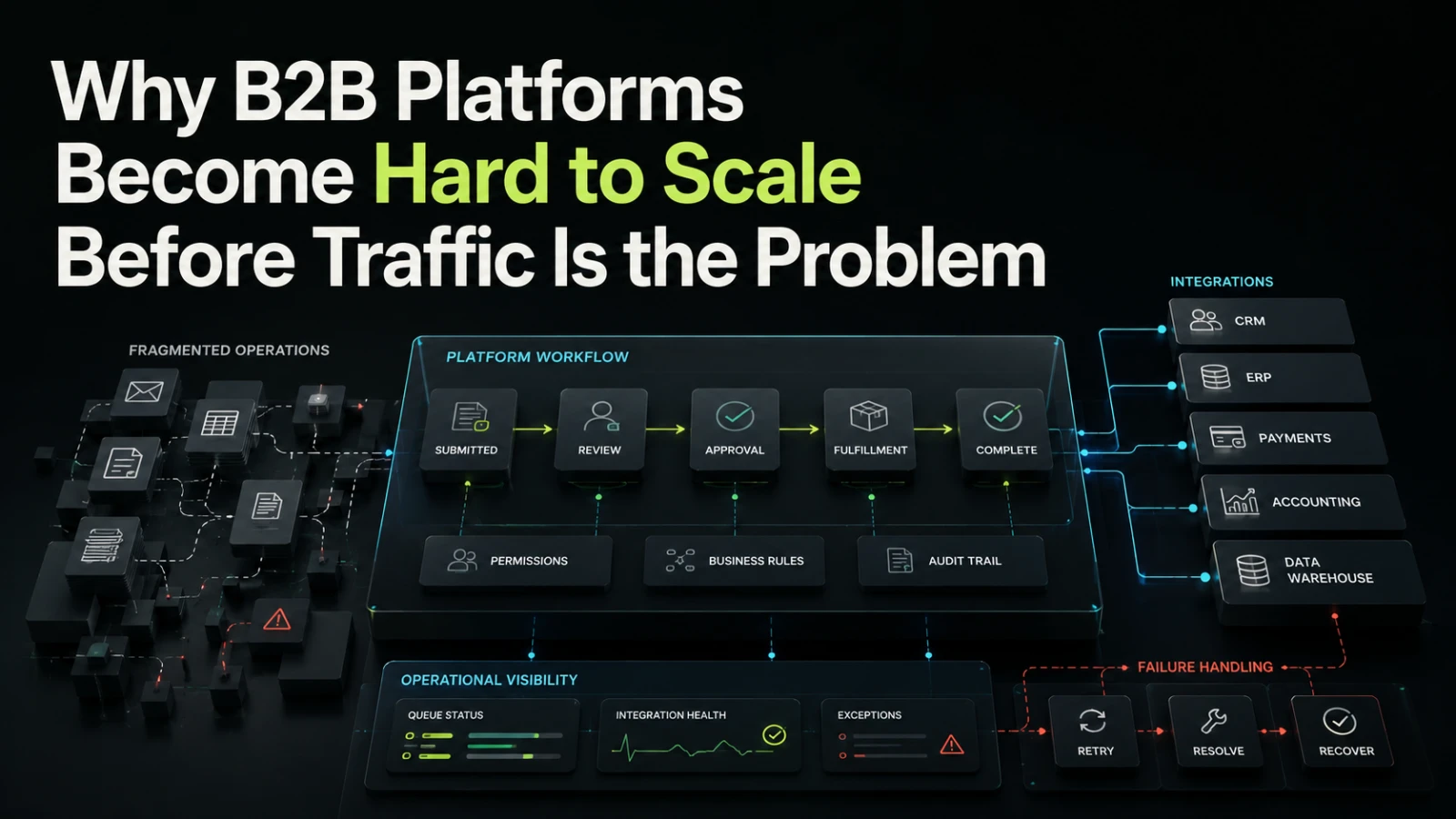
Most teams think about platform scalability in terms of traffic: more users, more requests, more database load, more infrastructure. That matters, but in many B2B systems the platform becomes hard to scale much earlier. The first serious scaling problem is often not technical volume. It is operational complexity.
A B2B platform can serve a small number of users and still become painful to maintain if every customer needs a slightly different workflow, every approval requires a manual workaround, integrations break silently, permissions are inconsistent, and no one can clearly explain the state of a process. Traffic may expose those problems later, but it rarely creates them.
Scaling Is Not Only About Load
For a consumer product, scaling often means handling more concurrent users. For a B2B platform, scaling usually means handling more business variation without turning the system into a collection of exceptions.
That variation may come from:
multiple customer organizations or departments
different approval paths
complex roles and permissions
manual review steps
third-party system integrations
reporting requirements
audit expectations
contract-specific rules
changing operational processes
A platform can have low traffic and still be difficult to change because the business logic is spread across code, spreadsheets, support conversations, admin overrides, and undocumented habits.
A B2B platform becomes hard to scale when the team can no longer reason confidently about what should happen next, who owns the decision, and where the source of truth lives.
That is why early architecture and workflow design matter. Not because every first version needs enterprise-grade infrastructure, but because the system should make future decisions easier rather than more expensive.
The Early Mistake: Building Screens Before Workflow State
Many rushed platforms start with screens: dashboards, forms, lists, admin panels, user profiles. Screens are visible, so they feel like progress. But B2B platforms are usually workflow systems underneath.
A workflow needs state. An order is not just an order. It may be drafted, submitted, reviewed, approved, rejected, revised, fulfilled, invoiced, cancelled, or archived. Each state affects who can act, what data can change, what should be logged, and what external systems must be notified.
When workflow state is not designed clearly, the platform starts depending on informal rules:
“Only the finance team should edit that after approval.”
“Support can reopen it, but only before invoicing.”
“This customer skips review unless the amount is above a threshold.”
“The integration should run again if the supplier changes.”
“The sales team needs to see it, but not edit it.”
These rules may be valid, but if they are not represented in the system, they become support burden, hidden risk, and change resistance.
What Usually Makes a B2B Platform Hard to Scale
The problem is rarely one bad decision. It is usually a set of small shortcuts that compound as more users, teams, customers, and workflows are added.
Scaling pressure | Shortcut that works early | Why it becomes expensive later |
|---|---|---|
Workflow variation | Add conditional logic wherever needed | Rules become scattered and hard to test |
User roles | Start with admin and regular user only | Permissions become risky when teams grow |
Integrations | Push data directly between systems | Failures are hard to retry, inspect, or explain |
Reporting | Query production data ad hoc | Metrics become inconsistent and slow to change |
Admin actions | Let internal staff edit records manually | No audit trail, unclear ownership, higher support risk |
Customer-specific needs | Add one-off fields and flags | The product becomes difficult to reason about |
Notifications | Send emails directly from user actions | Missed, duplicated, or incorrect messages are hard to trace |
Data ownership | Let multiple tools update the same record | Conflicts appear and trust in the platform drops |
Each shortcut may be reasonable in isolation. The risk appears when the system has no clear place for rules, state, ownership, and operational visibility.
Permissions Become a Product Problem
Permissions are often treated as a late-stage security task. In B2B platforms, they are part of the product model.
A simple permissions model might work for a first version:
owner
admin
member
But real B2B usage often needs more nuance:
team-level access
customer-level access
department-level approval
read-only finance visibility
temporary collaborator access
support impersonation or assisted access
restricted access to sensitive records
audit logs for privileged actions
If permissions are bolted on after the platform already has complex workflows, every change becomes more risky. The team has to ask, for each feature, “Who can see this, who can change it, and what should be recorded?”
That question should not be answered differently in every controller, component, or admin screen. A dependable system needs a clear permission model that business and technical stakeholders can both understand.
Integrations Fail in Operational Ways, Not Just Technical Ways
B2B platforms rarely live alone. They often connect to accounting tools, CRMs, ERPs, payment providers, spreadsheets, email systems, data warehouses, internal databases, or supplier portals.
The technical act of sending data to another system may be straightforward. The operational behavior is harder:
What happens if the external system is unavailable?
Can the operation be retried safely?
Who sees the failure?
Does the user need to wait?
Is the source record locked while syncing?
What happens if the external system accepts partial data?
Which system wins if both change the same field?
Is there an audit trail for the transfer?
A platform that only handles the happy path may look finished during demos, but create hidden manual work after launch. Operators then rely on screenshots, Slack messages, exported CSV files, and developer intervention to reconcile issues.
This is where queues, status tracking, idempotent operations, integration logs, and admin recovery tools become practical business features, not engineering decoration.
Reporting Problems Usually Reveal Data Model Problems
Many B2B platforms reach a point where leadership asks for better reporting. Revenue by workflow type. Approval time by team. Failed submissions by customer. Manual overrides by operator. Average time from request to completion.
If the platform was not designed around clear events and states, reporting becomes difficult. The data may exist, but not in a form that answers operational questions reliably.
For example, a timestamp called updated_at does not explain whether a request was approved, corrected, escalated, reopened, or synced. A free-text status field may be flexible at first, but weak for reporting later. Manual edits may fix individual records, while making trend analysis less trustworthy.
Good reporting starts with good operational modeling. The platform should know what happened, when it happened, who did it, and what changed as a result.
Generic SaaS, Internal Tools, and Custom Platforms
Not every business process needs a custom platform. Many workflows should start in existing tools. The decision usually depends on how specific, repeated, integrated, and business-critical the workflow has become.
Approach | Best fit | Main trade-off |
|---|---|---|
Spreadsheet or shared document | Early exploration, low volume, unclear process | Flexible, but weak ownership, validation, and audit trail |
Generic SaaS tool | Common workflow with standard rules | Fast to start, but may force the business into tool limitations |
Low-code internal tool | Admin workflows, operational dashboards, controlled use cases | Useful for speed, but can become fragile if business logic spreads |
Custom B2B platform | Repeated workflow with specific rules, integrations, roles, and reporting needs | Higher initial design effort, but clearer long-term control |
The right answer is not always “build custom software.” The right answer is to understand where the business needs control. If the workflow is core to delivery, customer experience, compliance, or operational efficiency, a more deliberate system may be justified.
AI Can Add Value, but It Does Not Fix Weak Workflow Design
AI-assisted features can help B2B platforms by classifying requests, drafting responses, extracting information, summarizing records, suggesting next actions, or highlighting exceptions.
But AI does not remove the need for workflow clarity. In fact, it often makes clear system boundaries more important.
Before adding AI-assisted steps, the platform should answer:
What decision is the AI helping with?
Is the output a suggestion or an action?
Who approves or corrects it?
What gets logged?
What happens when confidence is low?
Can the user trace why a record changed?
Does the AI step create new review work?
An AI-augmented workflow can reduce repeated manual effort when it is placed inside a well-defined process. It can increase confusion when it is used to cover unclear ownership or poorly modeled state.
What to Define Before Building the First Useful Version
A first version does not need every future feature. It does need enough structure to avoid becoming disposable too quickly.
Before building, define these items in practical language:
Core workflow states
What are the major stages a record, request, order, or case can pass through?Ownership at each stage
Who is responsible for action, review, correction, escalation, or completion?Permission boundaries
Who can view, create, edit, approve, override, export, or delete?Source of truth
Which system owns each important data field?Integration behavior
What should happen when an external system fails, delays, or returns unexpected data?Audit requirements
Which actions must be logged for support, accountability, or later review?Operational recovery
What can support or operations teams safely fix without developer intervention?Reporting needs
Which metrics will help the business understand throughput, exceptions, delays, and quality?
These decisions do not require a huge specification. They require enough clarity that the product, business, and technical teams are not building different mental models.
What Can Usually Wait
Good scoping also means knowing what not to build yet.
Early versions can often delay:
advanced analytics
complex self-service configuration
multi-region infrastructure
extensive theme customization
large marketplace-style extension systems
full automation of edge cases
elaborate admin tooling for rare events
What should not be delayed too long is the foundation that makes the platform understandable: workflow state, data ownership, permissions, integration boundaries, logging, and basic operational visibility.
A platform can improve its interface later. It is much harder to retrofit trust into data that users already doubt.
Warning Signs That Scaling Risk Is Already Building
A B2B platform may be approaching a scaling problem if the team regularly sees patterns like these:
support staff need developers to explain normal workflow behavior
users ask for status updates because the system does not show progress clearly
small changes require checking many unrelated areas of the application
customer-specific rules are stored as scattered flags or comments
failed integrations are discovered by customers before the internal team
reporting requires manual exports and spreadsheet cleanup
permissions depend on informal knowledge rather than a clear model
operations teams avoid using certain features because they do not trust the outcome
These issues are not just technical debt. They affect sales confidence, onboarding, support load, customer trust, and the cost of every future change.
Building for Scale Before Traffic
Scaling a B2B platform is not about over-engineering the first release. It is about designing the parts that will be expensive to change later.
That usually means:
model the workflow before polishing every screen
make state visible and inspectable
keep business rules in understandable places
design permissions as part of the product
treat integrations as operational workflows
log important actions clearly
build admin recovery paths for expected failures
separate early experiments from core system behavior
The goal is not to predict every future requirement. The goal is to make future requirements easier to absorb without turning the platform into a fragile set of exceptions.
If this is the kind of system your team is trying to make dependable, Aptenova can help assess the workflow, risk, and first practical build through a focused technical discussion: talk to Aptenova.
Conclusion
A B2B platform often becomes hard to scale before traffic is the problem because the real pressure comes from business complexity. More customers, roles, exceptions, integrations, approvals, and reporting needs expose whether the system has a clear operational model.
The strongest early platforms are not necessarily the biggest or most automated. They are the ones where teams can understand what is happening, change rules safely, recover from failures, and trust the data. That kind of scalability starts before infrastructure becomes urgent.
Put it into practice
Working through a similar problem?
Tell us about your product and the change you need. We can discuss a focused feature, a new integration, an AI workflow or a first release.