
How Technical Debt Becomes Operational Debt in B2B Systems
May 14, 2026
Technical debt does not stay hidden in the codebase. Over time, it turns into slower approvals, manual fixes, unclear ownership, fragile reporting, and higher delivery risk. This article explains how that shift happens and what teams should define before automating or rebuilding.
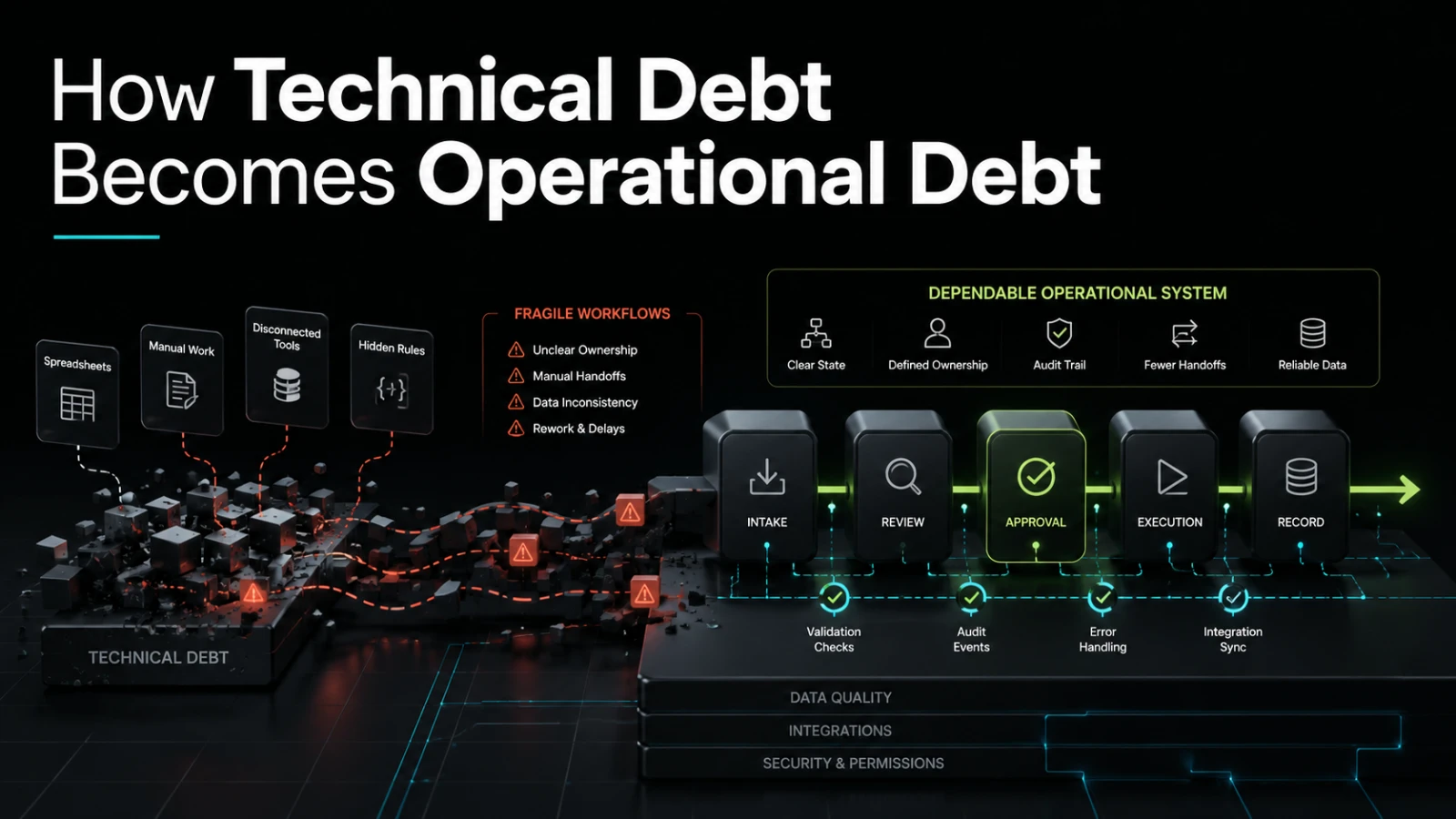
Technical debt is often discussed as an engineering problem: messy code, rushed architecture, missing tests, weak documentation, or shortcuts taken to ship faster. But in a working business system, technical debt rarely stays technical for long.
When the software supports approvals, customer onboarding, reporting, finance checks, inventory, fulfillment, partner communication, or internal operations, technical debt becomes operational debt. It creates extra manual work, unclear workflow state, repeated corrections, and decisions based on incomplete information. The code may be the source, but the business feels the cost.
Technical debt is not only a developer concern
A poorly structured feature can look harmless from the outside. The screen loads. The form saves. The report exports. The integration appears to work most of the time.
The problem is what happens when the workflow changes.
A new approval step is needed. A manager wants better visibility. A customer asks why their request is delayed. A finance team needs a reliable audit trail. A support team needs to know which system owns the latest status. Suddenly, a technical shortcut becomes a business constraint.
Technical debt becomes operational debt when software can no longer explain, support, or adapt to the work it is supposed to manage.
That shift usually shows up as:
manual checking between systems
spreadsheet workarounds around internal tools
unclear ownership of data
repeated support questions about status
fragile exports and imports
slow changes because small updates affect too many things
hidden rules known only by one person or one developer
higher risk when introducing automation or AI-assisted steps
The business impact is not just “the code is messy.” It is that daily work becomes harder to run, measure, and improve.
Where the conversion usually happens
Operational debt often starts when teams build around the immediate request instead of the underlying workflow.
For example, a team may ask for a simple admin field: “Add a status dropdown.” That sounds small. But the real workflow may include request intake, review, escalation, approval, rejection, customer notification, internal handoff, and reporting.
If the system only stores a status label, it may not know:
who changed the status
why it changed
what should happen next
whether the change was valid
which team owns the next action
whether an external system needs to be updated
whether the customer should be notified
At first, people compensate manually. They add notes in Slack, maintain a spreadsheet, send reminders, or ask someone to check the database. This keeps the operation moving, but it also creates a second unofficial system outside the product.
That is operational debt.
Common shortcuts that create operational drag
Not every shortcut is bad. Early products and internal tools need practical trade-offs. The risk appears when a shortcut becomes permanent without being named, owned, or revisited.
Shortcut | What it saves early | Operational debt it can create | Why it matters |
|---|---|---|---|
One generic status field | Faster feature delivery | Unclear workflow state and ownership | Teams cannot reliably see what should happen next |
Manual exports between tools | Avoids integration work | Duplicate data and reconciliation effort | Reporting becomes slower and less trusted |
Hardcoded business rules | Quick implementation | Changes require developer intervention | Operations cannot adapt without delivery delays |
No audit trail | Simpler database design | Harder investigation when something goes wrong | Accountability and compliance checks become harder |
Shared admin access | Less permission planning | Weak ownership and higher security risk | Teams cannot easily control who can do what |
No automated tests for core flows | Faster first release | Higher risk during changes | Small updates may break important workflows |
AI added on top of unclear processes | Faster experimentation | Faster production of inconsistent decisions | Automation amplifies workflow ambiguity |
The pattern is consistent: a technical shortcut saves time at the beginning, then pushes work into operations later.
The real cost is coordination
Technical debt is often measured in engineering terms, such as refactoring effort or defect risk. Operational debt is measured in coordination cost.
Coordination cost increases when people need to ask extra questions before they can do useful work:
Is this request approved or only reviewed?
Which spreadsheet is current?
Did the integration fail, or is the external system delayed?
Who owns this customer case now?
Can this action be reversed?
Why did the report change compared with last month?
Is this exception allowed, or did someone bypass the process?
Each question may seem small. Across a team, they become expensive. They slow handoffs, create rework, and make the system harder to trust.
A dependable internal system should reduce these questions. It should make workflow state easier to inspect, ownership clearer, and exceptions visible. It does not need to automate everything, but it should make the current state of work easier to reason about.
Why rushed automation can make it worse
Automation is useful when the process is understood. It is risky when the process is unclear.
Many teams try to reduce operational debt by adding automations around a fragile process. They connect tools, add notifications, introduce AI classification, or create scripts that move data between systems. Some of that can help, especially for repetitive work. But if the core workflow is poorly defined, automation can make problems move faster.
For example:
a notification can remind the wrong person faster
an integration can copy bad data into more places
an AI-assisted step can summarize incomplete inputs
a scheduled job can hide failures until the report is wrong
a dashboard can create confidence in data that is not governed
The issue is not automation itself. The issue is automating around unclear ownership, weak state management, and undocumented business rules.
Before automation, teams should define the workflow in plain operational terms:
What starts the process?
What are the valid states?
Who owns each state?
What decisions are manual?
What decisions can be automated?
What data must be trusted?
Which systems need to stay in sync?
What should happen when something fails?
These questions are not bureaucracy. They reduce implementation risk.
Technical debt hides in “almost working” systems
The most expensive systems are not always the ones that are obviously broken. Often, they are the ones that almost work.
An internal tool that handles 80 percent of cases but requires manual correction for the rest may be acceptable early. Over time, the exceptions become normal. People build habits around the gaps. New hires learn undocumented workarounds. Reports need manual cleanup. Managers stop trusting dashboards. Developers avoid touching certain parts of the system because the behavior is unclear.
That is how operational debt compounds.
A system can look functional while still creating drag in the business. Common signs include:
people exporting data to understand what the system should already show
managers asking for status updates outside the tool
support teams relying on memory or chat history
finance teams correcting data after the workflow is complete
developers needing business context for every small change
product owners struggling to explain current rules
automation ideas being blocked by inconsistent data
When these symptoms appear, the next useful step is not always a full rebuild. Sometimes the right move is to improve one core workflow, define ownership, add auditability, or replace a fragile manual bridge with a controlled integration.
Rebuild, patch, or improve the workflow?
Teams often frame the decision as “keep the old system or rebuild it.” That can be too narrow. The better question is: where is the operational debt actually coming from?
Option | Best fit | Main trade-off |
|---|---|---|
Patch the existing system | A narrow issue with clear cause and low workflow impact | Can extend the life of weak foundations if overused |
Improve one workflow | A repeated process causes manual effort or unclear ownership | Requires careful scoping and stakeholder alignment |
Add integration | Data is duplicated between systems with predictable rules | Failure handling and ownership must be defined |
Build an internal tool | Teams rely on spreadsheets, inboxes, or chat to run core work | Needs clear state, permissions, and reporting requirements |
Rebuild a platform area | Current structure blocks change across important processes | Higher short-term effort, but may reduce long-term delivery risk |
A rebuild should not be the default recommendation. It is justified when the current system makes important change unsafe, expensive, or unclear. In many cases, targeted remediation gives the business more value with less disruption.
What to define before fixing the software
Before asking developers to clean up code, rebuild features, or automate tasks, define the operational problem clearly.
A useful scope should answer:
Which workflow is affected?
Be specific. “Operations is slow” is vague. “Customer onboarding requires three manual checks across two systems before approval” is usable.Where does work become unclear?
Identify the point where people lose visibility, ownership, or confidence in the data.Which manual steps are intentional?
Not every manual decision should be automated. Some require human judgment, risk review, or customer context.Which manual steps are waste?
Copying data, chasing approvals, reconciling exports, and checking whether a system updated correctly are usually candidates for improvement.What does the system need to prove?
This may include who changed something, when it changed, why it changed, and what happened next.What should happen when automation fails?
Dependable software needs failure paths, not only happy paths.
These answers help turn technical cleanup into business improvement. They also help avoid building a polished version of the wrong process.
AI does not remove the need for workflow clarity
AI-assisted workflows can reduce manual effort in areas such as classification, drafting, summarization, extraction, routing, and internal support. But AI works best when the surrounding system is clear.
If the workflow state is vague, permissions are loose, data is inconsistent, and failure handling is undefined, AI can add another layer of uncertainty. It may produce useful suggestions, but the business still needs rules for review, approval, storage, auditability, and escalation.
The practical approach is usually not “replace the workflow with AI.” It is to use AI where it supports a defined workflow:
extracting structured inputs from messy messages
suggesting categories for human review
summarizing history before a decision
drafting responses based on approved data
identifying exceptions that need attention
AI can reduce effort, but it should not become the place where business logic hides.
The practical conclusion
Technical debt becomes operational debt when software stops making work easier to run. The symptoms appear outside the codebase: slower approvals, more spreadsheets, weaker reporting, unclear ownership, repeated rework, and higher risk when changes are needed.
The fix is not always a rebuild, and it is not always more automation. The better path is to identify the workflow that creates the most drag, define the state and ownership clearly, then improve the software around that reality.
For founders, operators, product owners, and technical leads, the key lesson is simple: do not judge a system only by whether it works today. Judge it by how clearly it supports change, inspection, responsibility, and failure handling.
If this resembles a workflow inside your business, Aptenova can help assess the workflow, risk, and first practical build.
Put it into practice
Working through a similar problem?
Tell us about your product and the change you need. We can discuss a focused feature, a new integration, an AI workflow or a first release.