
From Manual Process to Software Product: What to Automate First
May 14, 2026
A practical guide for deciding which manual process should become software first. Learn how to compare workflow pain, business value, integration risk, ownership, and product scope before building an internal tool, automation, or custom platform.
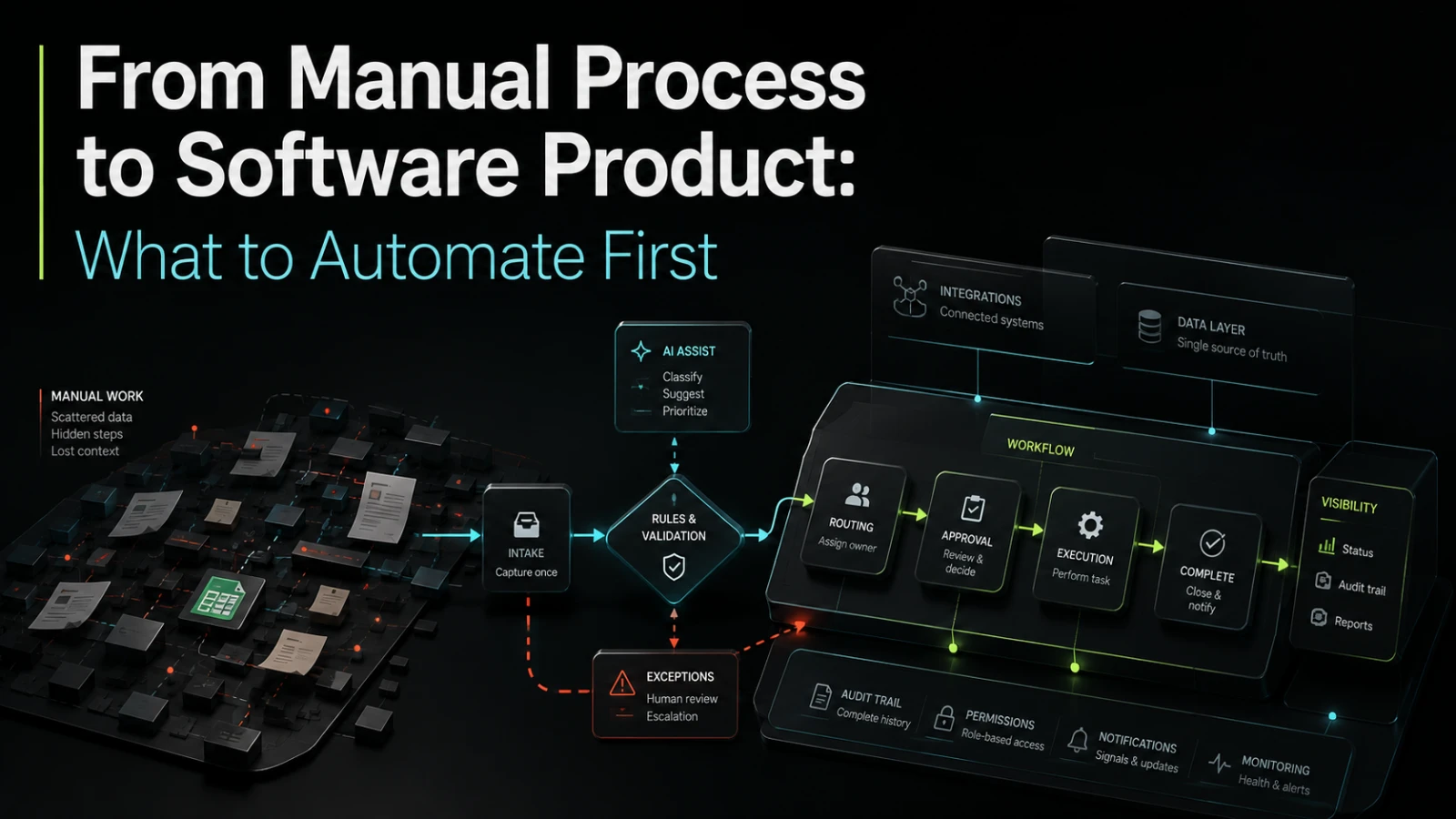
Manual work is not automatically a software problem. Some manual steps are useful because they keep judgment close to the customer, expose exceptions early, or allow a team to learn before committing to a system. Other manual steps quietly drain capacity every week, create inconsistent handoffs, hide operational risk, and slow down growth.
The hard part is not deciding whether automation sounds attractive. It is deciding what to automate first. The first build should not be the most ambitious idea, the loudest complaint, or the process with the most spreadsheets. It should be the smallest dependable software step that reduces repeated work, improves visibility, and gives the business a clearer operating model.
Automation starts with workflow clarity, not software
Many teams jump from “this is manual” to “we need a platform.” That shortcut usually creates scope risk.
Before software can help, the team needs to understand the actual process:
Who starts the workflow?
What information is required?
Which steps are repeated every time?
Where do approvals, exceptions, or delays happen?
Which systems need to exchange data?
Who owns the outcome when something fails?
What should be visible to managers, customers, or partners?
A manual process often works because people carry missing context in their heads. Software cannot do that safely. Once a process becomes a product, hidden judgment, informal exceptions, and unclear ownership need to be converted into visible rules, states, permissions, and notifications.
That is why the first automation target should usually be a process that is already understood well enough to define. If the process changes every week, automation may freeze confusion into code.
What teams usually get wrong
The most common mistake is automating around symptoms instead of causes.
A team may build a dashboard because managers lack visibility, when the real issue is that workflow state is not captured consistently. Another team may connect two systems with a simple integration, then discover that duplicate records, unclear ownership, and missing validation still require manual cleanup. A founder may commission a full product build before proving which part of the workflow creates repeatable value.
Rushed automation often creates a second system for people to maintain, instead of reducing work. The result is familiar: staff still use spreadsheets, the new tool becomes incomplete, and the business now has both manual effort and software maintenance.
The first useful automation is not the one that removes every human step. It is the one that makes the next action, owner, and status easier to trust.
A useful decision table
The best first target usually sits where manual effort is high, workflow rules are clear, and implementation risk is contained.
Candidate process | Manual effort | Workflow clarity | Integration risk | Business value | Good first automation? |
|---|---|---|---|---|---|
Repeated data entry between known systems | High | High | Medium | High | Often yes |
Complex approval flow with stable rules | Medium | High | Medium | High | Often yes |
Customer-specific exception handling | Medium | Low | High | Medium | Usually not first |
Weekly reporting from spreadsheets | High | Medium | Low to medium | Medium | Good if metrics are trusted |
New product idea with untested demand | Unknown | Low | Unknown | Potentially high | Prototype first |
Internal knowledge sharing | Medium | Low | Low | Medium | Clarify process first |
This table is not a formula. It is a way to avoid building based only on frustration. A painful process can still be a poor first automation if the rules are unclear, the data is unreliable, or the integrations are likely to dominate the budget.
What to automate first
A strong first automation target usually has five traits.
1. It happens often enough to matter
Automating a rare process may feel satisfying, but it rarely changes operations. Look for work that repeats daily or weekly, especially when skilled people spend time copying data, chasing approvals, preparing status updates, or reconciling records.
Frequency matters because every small improvement compounds. It also gives the team enough usage to test whether the software actually fits the workflow.
2. The current process has visible cost
Cost is not only payroll time. Manual work can create delayed sales handoffs, missed follow-ups, inconsistent customer experience, limited audit trail, and rework after errors.
A good candidate has pain that the business can describe clearly:
“We re-enter the same order data into three places.”
“Nobody knows which requests are waiting for approval.”
“Reports take two days because the source data is inconsistent.”
“The same customer issue is handled differently by each team.”
“We cannot safely scale this process without adding more coordinators.”
These are stronger signals than “the spreadsheet is ugly.”
3. The rules are stable enough to encode
Software needs rules. Even AI-assisted workflows need boundaries, fallback paths, permissions, and review points.
A process is ready for automation when the team can define most of the normal path:
required inputs
valid statuses
approval conditions
exception categories
responsible roles
notifications
data sources
success criteria
If every case requires debate, automate the supporting visibility first, not the decision itself. For example, build a request intake and status tracker before trying to automate the final approval logic.
4. The first version can be small
The best first build does not need to replace the whole operation. It should create a reliable slice of value.
For example:
Broad ambition | Better first version |
|---|---|
“Automate our entire operations process” | Centralize request intake, ownership, and status |
“Build a client portal” | Let clients submit structured requests and track progress |
“Replace our spreadsheets” | Move the highest-risk workflow state into a database-backed tool |
“Use AI to handle support” | Classify incoming requests and suggest responses for review |
“Integrate everything” | Connect the two systems that cause the most repeated manual entry |
Small does not mean disposable. A good first version should be simple, but still dependable enough to use in real work.
5. Ownership is clear
Automation fails when nobody owns the process after launch.
Before building, decide who will maintain rules, review exceptions, update content, manage access, and decide what happens when the workflow changes. Without ownership, even a well-built tool becomes stale.
This is especially important for internal tools. They often start as “just for the team,” then become critical to delivery, reporting, finance, or customer operations. Once a tool becomes part of daily work, it needs clear operational ownership.
Manual process vs software product
Turning a manual process into software changes more than the interface. It changes how the business represents work.
Area | Manual process | Software product |
|---|---|---|
Status | Held in messages, spreadsheets, or memory | Captured as workflow state |
Ownership | Often implied | Assigned explicitly |
Audit trail | Scattered or incomplete | Easier to inspect if designed properly |
Exceptions | Handled informally | Need defined paths or escalation |
Reporting | Built after the fact | Can be generated from structured data |
Change cost | Low at first, messy later | Higher upfront, easier to control if scoped well |
Failure mode | People chase and correct manually | System needs monitoring, alerts, and support paths |
This is why automation should be treated as product work, even for internal systems. The goal is not just to create screens or scripts. The goal is to create a workflow that people can trust, operate, and improve.
What should stay manual, at least for now
Not every step should be automated early.
Keep work manual when it depends on high-context judgment, has unclear rules, or changes too often to justify productization. Also be careful with sensitive decisions where automation could create compliance, customer trust, or operational risk if poorly governed.
Good examples of steps to keep human-led include:
final approval on unusual commercial terms
customer escalations with incomplete information
strategic prioritization
exception handling that has not been categorized
quality review for AI-generated outputs
decisions where accountability must remain with a named person
A practical approach is to automate the structure around these decisions first. Intake, routing, reminders, audit trail, and reporting can reduce workload without pretending that every judgment call should be replaced.
The first build should prove the operating model
A first software version should answer a business question, not only a technical one.
Can the team work from structured requests instead of scattered messages? Can managers trust the workflow status? Can data move between systems without manual re-entry? Can exceptions be handled in a consistent way? Can the process scale without adding the same amount of coordination work?
This is where custom software, internal tools, integrations, and AI-assisted workflows can be useful. But the implementation should match the maturity of the process.
Sometimes the right answer is a lightweight internal tool. Sometimes it is an integration between existing systems. Sometimes it is a prototype to test a product idea. Sometimes it is technical remediation because the current system already works, but is too fragile to extend safely.
Questions to answer before building
Before turning a manual process into software, define the first useful scope in plain business terms.
A good starting brief should answer:
What repeated work are we reducing?
Which users are involved?
What starts and ends the workflow?
What data must be captured once and reused?
Which systems must connect now, and which can wait?
What should be visible in reports or dashboards?
Which exceptions are common enough to support?
Which decisions must remain manual?
Who owns the workflow after launch?
What would make the first version worth using every week?
These questions reduce delivery risk because they turn a vague automation idea into a product scope. They also help technical teams identify where the real complexity sits: data quality, permissions, integrations, workflow state, reporting, AI review, or change management.
When to talk to a software partner
A software partner is useful when the process is important enough to improve, but unclear enough that building immediately would be risky.
That conversation should not start with a feature list. It should start with workflow mapping, system boundaries, user roles, data movement, failure points, and the smallest version that can create operational value.
If your team is deciding whether to automate a repeated process, rebuild a fragile internal tool, or turn an operational workflow into a dependable product, Aptenova can help assess the workflow, technical risk, and first practical build.
Conclusion
The right first automation target is rarely the biggest idea. It is the process where repeated effort, clear rules, visible business value, and manageable implementation risk meet.
Start with a workflow that the business understands. Define the state, ownership, data, exceptions, and success criteria. Keep judgment where humans add value. Build the smallest dependable version that reduces real operational drag.
That is how a manual process becomes software without turning into a costly second process to maintain.
Put it into practice
Working through a similar problem?
Tell us about your product and the change you need. We can discuss a focused feature, a new integration, an AI workflow or a first release.